
Simulation of the Order of Adding Vectors
Loading the math board and drawing, please wait…
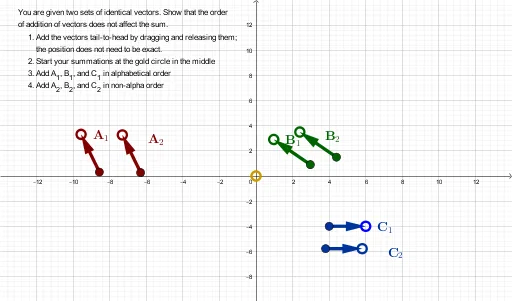
This GeoGebra example demonstrates how different orders of adding vectors can lead to distinct configurations when the construction includes randomized elements and position/constraint checks. It centers on vector addition concepts—especially how vector sums relate to direction and component endpoints—and uses condition-based verification to compare results across multiple ordering scenarios. The construction uses Random to generate candidate geometric/vector components, Intersect to determine intersection points that satisfy required geometric relationships, and Vector to build the vector objects from Tail/Head points. Key objects include multiple Tail/Head point sets (e.g., V5Tail/V5Head, V4Tail/V4Head, V6Tail/V6Head and V1/V2/V3 variants) together with constraint objects (e.g., PosCondV5V4V6, PosCondV4V5V6, PosCondV6V5V4, PosCondV4V6V5, ABC1Cond, ABC2Cond) that validate or reject configurations (including a check mechanism such as CheatCheck). Suitable for high school to early university learners studying vectors, geometry construction, and constraint-driven visualization.
GeoGebra Commands & Parameters
Random(-3, 3) → xARandom(2, 3) → yAIntersect(xAxis, yAxis) → OriginRandom(-2, -3) → xBRandom(2, 3) → yBRandom(-3, 3) → yCRandom(2, 3) → xCVector(V2Tail, V2Head) → V2Vector(V6Tail, V6Head) → V6Vector(V3Tail, V3Head) → V3Vector(V4Tail, V4Head) → V4Vector(V5Tail, V5Head) → V5Vector(V1Tail, V1Head) → V1
AI Drawing Prompt Reference
Create a visualization showing how the order of adding vectors affects the result, incorporating randomly generated vectors. The diagram includes multiple vectors with their starting and ending points randomly generated, and then these vectors are drawn. Next, combine these vectors in different orders of addition to observe the changes in the resulting vectors. Finally, use conditional checks to verify if the results are consistent across different addition orders.
The prompt above was compiled from the original drawing commands and is for reference only.