
Simple Tangent: Exploring tan(α) in a Dynamic Triangle
Loading the math board and drawing, please wait…
In collections
Trigonometry: Basic and More
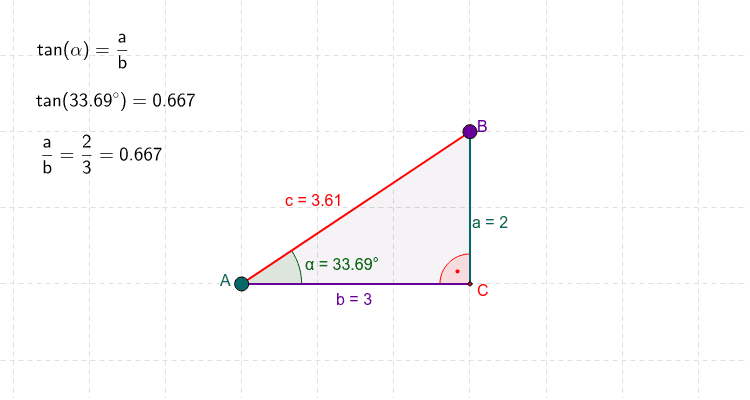
① This example demonstrates a draggable right triangle where the value of tan(α) updates in real time as points A and B are moved. ② The core mathematical concept is the definition of the tangent function in a right triangle—the ratio of the opposite side to the adjacent side—along with angle measurement and dynamic geometry. ③ Construction details: using GeoGebra commands Polygon to create triangle ABC, Angle to mark angle α, and movable points A and B, with text objects text1, text2, text3 displaying side lengths and the computed tan(α) value. ④ Suitable for upper middle school or lower high school students learning introductory trigonometry, and for teachers demonstrating the relationship between geometric configuration and tangent values in a classroom setting.
GeoGebra Commands & Parameters
Polygon(A, B, C) → P, c, a, bAngle(C, A, B) → αAngle(B, C, A) → β
AI Drawing Prompt Reference
Draw a draggable right triangle with one angle labeled as α, and display the real-time value of tan(α) for this angle. The triangle consists of three points, two of which can be moved to change the triangle's shape, while the third point is fixed as the right angle. Label the right angle α within the triangle and show the lengths of the two legs and the value of tan(α).
The prompt above was compiled from the original drawing commands and is for reference only.