
Similar Triangles Construction and Property Exploration
Loading the math board and drawing, please wait…
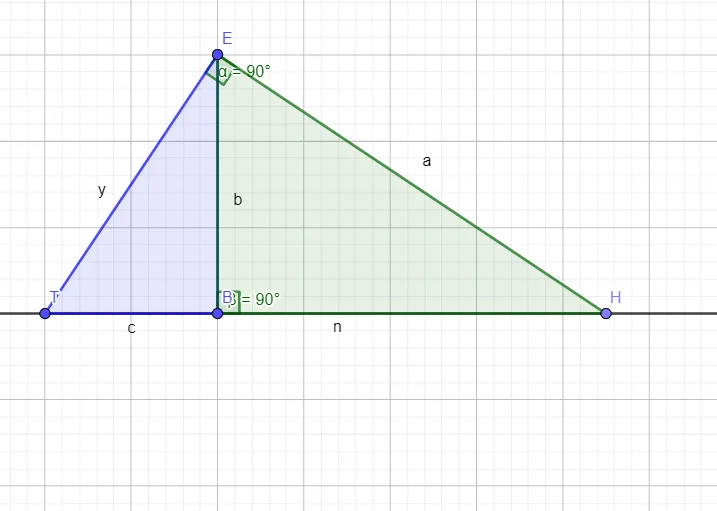
This example demonstrates how to construct similar triangles using GeoGebra and explore their geometric properties. The core mathematical concepts include similarity criteria (SSS, SAS, AA), proportional relationships between corresponding sides, and equal corresponding angles. Construction points: Use the Line command to draw triangle sides, Point command to define key vertices, Polygon command to construct triangles, and Angle command to mark and measure angles. Parameters like α and β control the triangle shape changes. The objects t1, t2 (two triangles) and b, b_1, d, d_1 (corresponding side lengths) show the proportional relationships of similar triangles. Suitable for middle school to high school mathematics courses, helping students understand similarity concepts, master geometric construction skills, and verify similarity theorems.
GeoGebra Commands & Parameters
Line(T, B) → fPoint(f) → HPolygon(T, E, B) → t1, b, a, dPolygon(E, H, B) → t2, b_1, d_1, cAngle(T, E, H) → αAngle(E, B, H) → β
AI Drawing Prompt Reference
Draw two similar triangles, one with vertices T, E, B and another with vertices E, H, B. Use the line tool to connect points T and B, then add points H and E in their respective triangles. Use the polygon tool to draw both triangles and mark angles T, E, H and E, B, H as α and β, respectively, to observe the proportional relationships between corresponding sides.
The prompt above was compiled from the original drawing commands and is for reference only.