
Similar Triangles and Trigonometry
Loading the math board and drawing, please wait…
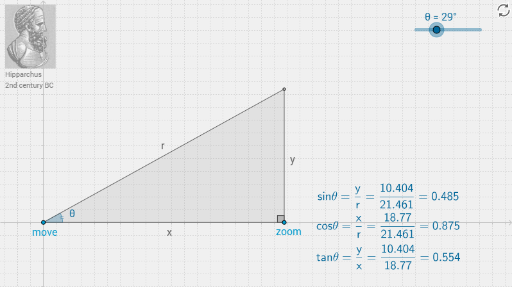
This example demonstrates how to construct similar triangles and visualize trigonometric relationships using GeoGebra. Key math concepts include the criteria and properties of similar triangles, and the definition and application of trigonometric functions. Construction highlights involve commands like Line, Point, Segment, Rotate, OrthogonalLine, Intersect, Angle, Midpoint, Polygon, etc. Suitable for high school mathematics instruction or student exploration of the intrinsic connection between triangles and trigonometry.
GeoGebra Commands & Parameters
Line(A, xAxis) → aPoint(a) → EPoint(a) → DSegment(E, D) → gPoint(a) → BRotate(B, θ, A) → B'Line(A, B') → cOrthogonalLine(B, xAxis) → bIntersect(b, c) → CSegment(C, A) → ρSegment(B, C) → ψAngle(B, A, B') → φSegment(A, B) → χAngle(C, B, A) → βMidpoint(χ) → FMidpoint(ψ) → GMidpoint(ρ) → HPolygon(A, C, B) → poly1, b_1, a_1, c_1
AI Drawing Prompt Reference
Draw a right-angle coordinate system. Start by drawing a line segment on the x-axis and mark two points on it. Connect these two points. From one endpoint, rotate the line segment by a certain angle around the other endpoint to get a new point, then connect this new point to the rotation center. Draw a line perpendicular to the x-axis through the new point, and let it intersect the previously drawn line segment. Connect the intersection point to the rotation center and to the new point, forming three triangles. Label the vertices and edges of the triangles, calculate the midpoints of the edges, and finally, fill the three triangles with borders and colors.
The prompt above was compiled from the original drawing commands and is for reference only.