
Similar Triangles #2: Rotation and Parallel Lines Construction
Loading the math board and drawing, please wait…
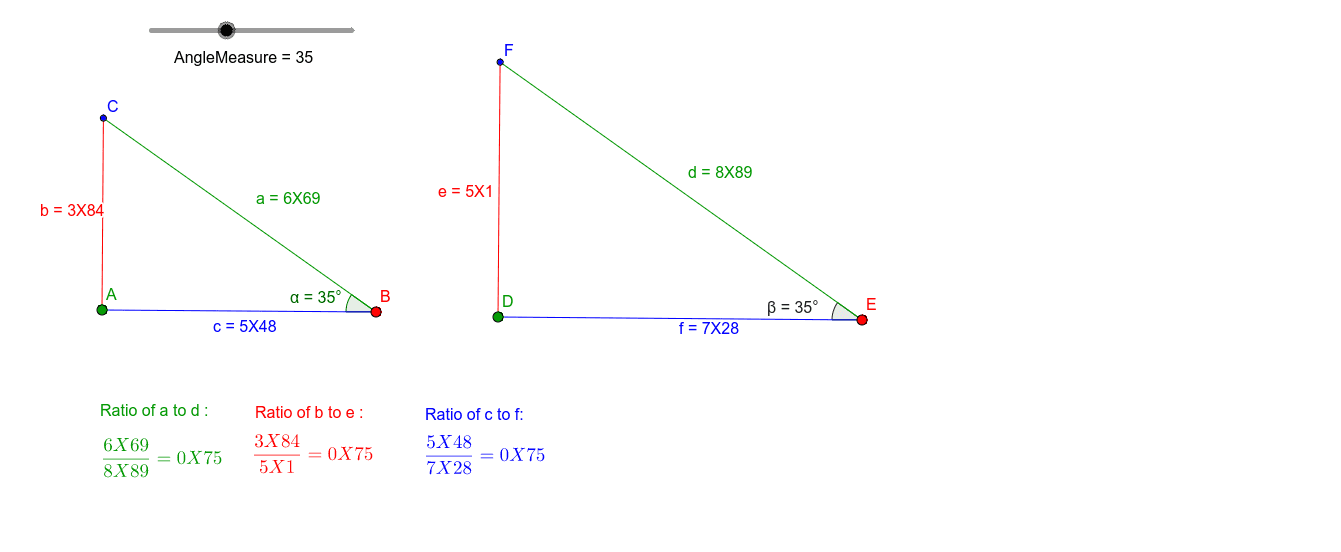
This GeoGebra example demonstrates the construction and verification of similar triangles through rotation, perpendicular lines, and intersections. The core mathematical concept is the similarity of triangles, focusing on angle correspondence (e.g., angles generated by rotation) and parallel-line transversal relationships. The construction uses commands such as Segment, Rotate, Angle, Ray, OrthogonalLine, and Intersect to build multiple triangles and auxiliary lines. It is suitable for upper middle school or high school students learning geometric proofs and dynamic constructions, and serves as an interactive teaching tool for exploring similarity criteria.
GeoGebra Commands & Parameters
Segment(A, B) → cRotate(A, (-(AngleMeasure°)), B) → A'Angle(A', B, A) → αRay(B, A') → gOrthogonalLine(A, c) → hIntersect(h, g) → CSegment(C, A) → bSegment(C, B) → aSegment(D, E) → fRotate(D, (-(AngleMeasure°)), E) → D'Angle(D', E, D) → βRay(E, D') → lOrthogonalLine(D, f) → mIntersect(m, l) → FSegment(F, D) → eSegment(F, E) → d
AI Drawing Prompt Reference
Draw two similar triangles. Start with a horizontal segment as a base. Rotate one endpoint around the other by a given angle to create a ray. From the other endpoint, draw a perpendicular line to the base, intersecting the ray to form the first triangle. Then, draw another parallel segment elsewhere, repeat the same rotation and perpendicular construction to form the second triangle. The two triangles have corresponding equal angles and are similar due to parallel lines.
The prompt above was compiled from the original drawing commands and is for reference only.