
Ship Pursuit and Torpedo Launch Simulation: Dynamic Vectors and Parametric Curve
Loading the math board and drawing, please wait…
In collections
Vector Applications
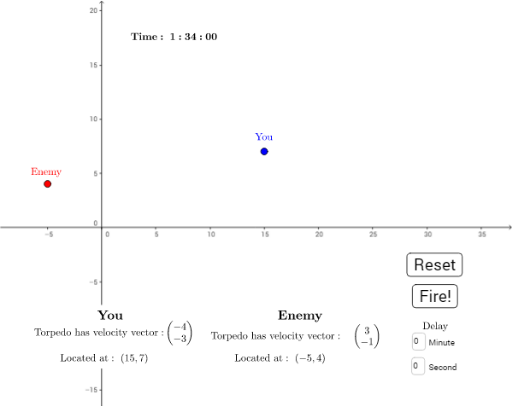
① This GeoGebra example simulates the motion of two ships (You and Enemy) on a plane, including pursuit and torpedo launch interactions, vividly demonstrating vector operations and parametric curves in dynamic geometry. ② Core mathematical concepts include vectors (velocity and displacement), parametric curves (trajectories of ships and torpedoes), centroid/barycenter (possibly for target point calculation), arithmetic mean (for smoothing or average positions), differential calculus (rate of change of velocity), and hypothesis testing (possibly for hit determination or random error analysis). ③ Construction highlights: From the summary, commands such as Dilate, Textfield, If, Line, Intersect, and Random are used; objects include velocity components vx_E, vy_E, vx_Y, vy_Y, time variables Time, Hour, Minute, Second, torpedo objects Torpedo_E and Torpedo_Y, and interactive controls via button1 and sliders (Delay_S, Delay_M). ④ Suitable for high school to university-level mathematics instruction, for teaching vectors, parametric equations, kinematics simulation, and GeoGebra interactive design, as well as for mathematical modeling or game-based learning.
GeoGebra Commands & Parameters
Dilate(A', Time - 94, Enemy) → Torpedo_EDilate(B', Time - 94 - Delay, You) → Torpedo_YTextfield(Delay_M) → InputBox2Textfield(Delay_S) → InputBox3If(Second < 10, ("0" * Second), ("" * Second)) → Display_SLine(Enemy, A') → bLine(You, B') → cIntersect(b, c) → ExplodeRandom(1, 5) → aDilate(A', Time - 94, Enemy) → Torpedo_E'Dilate(B', Time - 94 - Delay, You) → Torpedo_Y'
AI Drawing Prompt Reference
Create a dynamic simulation of two ships (yours and enemy's) moving on a plane, with the enemy pursuing yours and launching torpedoes. Use vector arrows for velocities and displacements, and parametric curves for the trajectories of both ships and torpedoes. Torpedoes launch from the enemy ship along a line toward your ship's current position, with adjustable launch delay. Mark the intersection of the two ships' trajectory lines as an explosion point. Include a time display (hours, minutes, seconds), two input boxes for delay settings, and a random number generator for perturbation. Emphasize vector operations, parametric curves, and interactive dynamics.
The prompt above was compiled from the original drawing commands and is for reference only.