
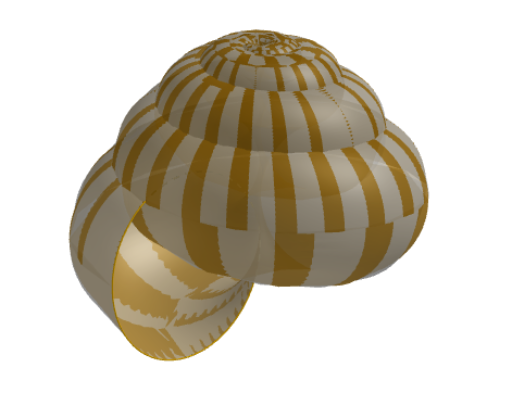
Shell Periwinkle (3D)
Loading the math board and drawing, please wait…
This example demonstrates a 3D spiral shell shape. It involves parametric equations and solid geometry concepts. Using commands like CurveCartesian, Sequence, and Surface, a 3D model of the spiral shell can be constructed. Suitable for high school students and math enthusiasts.
GeoGebra Commands & Parameters
CurveCartesian(Gx((2 * π), v), Gy((2 * π), v), Gz((2 * π), v), v, 0, 6.28319) → Circle_{u=2pi}Sequence(CurveCartesian[Gx(u, v), Gy(u, v), Gz(u, v), v, 0, 6.28319], u, 0, 6.28319, π / ((N * 6))) → Circles_uSequence(CurveCartesian[Gx(u, v), Gy(u, v), Gz(u, v), u, 0, 6.28319], v, 0, 6.28319, π / N) → Spirals_vSurface(Gx(u, v), Gy(u, v), Gz(u, v) + 0.0001, u, 0, 6.2831, v, 0, 6.2831) → Gperi2Surface(Gx(u, v), Gy(u, v), Gz(u, v), u, 0, 6.28315, v, 0, 6.2832) → Gperi1
AI Drawing Prompt Reference
Create a 3D spiral shell shape using parametric equations and solid geometry. Start by drawing a circle with a radius of 2π, then generate multiple concentric circles around it, followed by spirals inside the circle. Finally, combine the spirals and circles to form the surface of the 3D spiral shell.
The prompt above was compiled from the original drawing commands and is for reference only.