
Sets and Probability
Loading the math board and drawing, please wait…
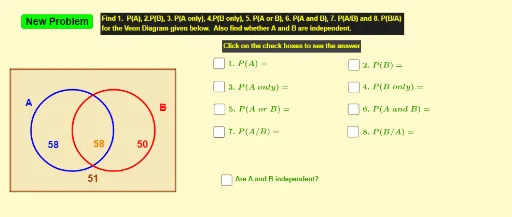
This example demonstrates the basic concepts of sets and probability. It involves set operations and probability calculations. Using GeoGebra commands such as Point, Circle, Random, Polygon, etc., it dynamically illustrates set intersections, unions, and probability calculations. Suitable for middle and high school students to learn about sets and probability.
GeoGebra Commands & Parameters
Point(xAxis) → APoint(xAxis) → B_1Circle(A, B_1) → cCircle(C, D) → dRandom(20, 60) → oRandom(20, 60) → aRandom(20, 60) → bRandom(20, 60) → allPolygon(E, F, G, H) → q1, e_1, f_1, g, hPoint(q1) → I
AI Drawing Prompt Reference
Draw a circle with a random radius between 20 and 60 on the x-axis. Draw another circle with a random radius between 20 and 60 on the x-axis. Randomly select a number between 20 and 60 as an element of a set. Then draw a quadrilateral with four vertices at randomly generated points. Finally, randomly generate a point inside the quadrilateral.
The prompt above was compiled from the original drawing commands and is for reference only.