
Separation: Interactive 3D Surface with Similarity Transformation
Loading the math board and drawing, please wait…
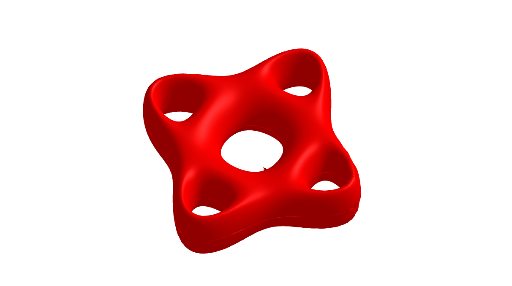
①This example demonstrates a 3D surface named 'separation' in GeoGebra, visually illustrating how spatial shapes behave under similarity transformations. ②Core mathematical concepts include solid geometry (surface construction), similarity transformation (scaling/translation), polygons, power functions, and addition operations affecting the geometry. ③Construction highlights: The Surface command is used to generate the surface, with objects a, b, c, s, d, e serving as parameters or geometric elements; adjusting these objects dynamically separates or recombines the surface, showcasing parametric modeling. ④Suitable for high school and above, this is ideal for teaching 3D geometry, understanding similarity transformations, and advancing GeoGebra 3D graphing skills, also useful for mathematical modeling or inquiry-based learning.
GeoGebra Commands & Parameters
Surface(u, v, sqrt(b - (sqrt((u^(2) - c)^(2) + (v^(2) - c)^(2)) - a)^(2)), u, -5, s, v, -5, 5) → dSurface(u, v, (-sqrt(b - (sqrt((u^(2) - c)^(2) + (v^(2) - c)^(2)) - a)^(2))), u, -5, s, v, -5, 5) → e
AI Drawing Prompt Reference
Create a 3D surface consisting of two symmetric thin shells, resembling a flattened crater or funnel. The surface height is determined by a formula involving the distance from a point on the horizontal plane to two fixed centers, modified by a scaling parameter. Horizontally, the surface extends from -5 to a variable positive value, and vertically from -5 to 5. Adjusting several key parameters changes the separation or merging of the shells, demonstrating the effect of similarity transformations on spatial shapes. Include coordinate axes and a grid for spatial reference.
The prompt above was compiled from the original drawing commands and is for reference only.