
Select the Appropriate Numbers
Loading the math board and drawing, please wait…
In collections
Ⓔ Zahlenmengen
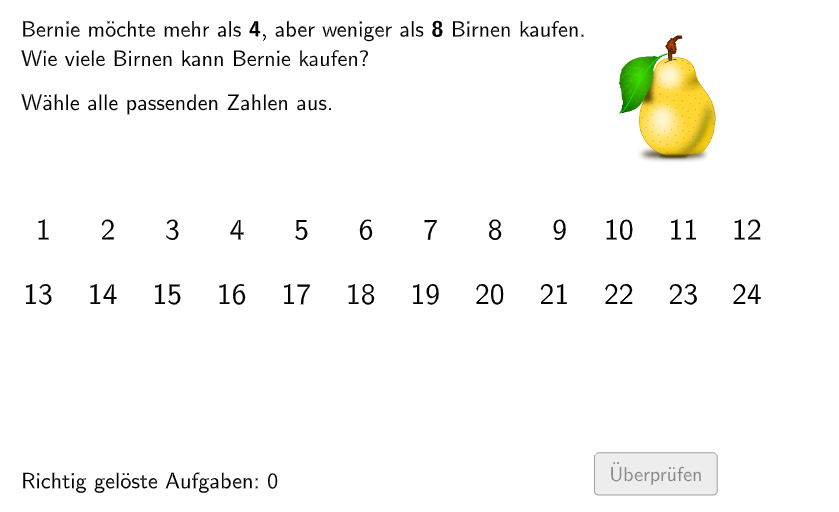
This example demonstrates how to select appropriate numbers from a given list for operations, involving core math concepts like natural numbers, division, standard deviation, ratios, random number generation, and geometric constructions. It utilizes GeoGebra commands and objects such as Append, Remove, Shuffle, Element, Join, Textfield, Polygon, Line, Sequence, and Circle. Suitable for high school mathematics teaching, focusing on probability & statistics and geometric constructions.
GeoGebra Commands & Parameters
Append(true, Sequence[If[name(i) ≟ name(i - 1), false, true], i, 2, 100]) → stayXRemove(Sequence[If[stayX(i), name(i), 0], i, 1, 100], Sequence[0, i, 1, 100]) → nameNoRepeatShuffle({1, 2, 3, 4, 5, 6}) → randomNosForY, {1, 5, 6, 2, 4, 3}Element(randomNosForY, Mod[questionCount, 100] + 1) → numYShuffle(Sequence[Random[6, 9], i, 1, 100]) → bsp1b, {8, 8, 9, 9, 9, 9, 8, 6, 6, 7, 8, 6, 6, 8, 6, 9, 9, 9, 7, 6, 7, 6, 7, 6, 9, 9, 9, 8, 7, 8, 9, 6, 9, 9, 6, 8, 9, 8, 6, 8, 8, 8, 6, 6, 7, 9, 8, 9, 7, 7, 9, 7, 6, 9, 6, 6, 8, 6, 7, 8, 7, 6, 9, 8, 9, 8, 6, 9, 7, 7, 8, 6, 9, 6, 6, 6, 8, 9, 8, 9, 9, 6, 9, 7, 8, 7, 8, 7, 7, 9, 9, 8, 6, 9, 8, 7, 6, 9, 9, 9}Element(bsp1b, Mod[questionCount, 100] + 1) → num1bShuffle(Sequence[Random[2, 4], i, 1, 100]) → bsp1a, {2, 4, 4, 4, 3, 3, 3, 2, 2, 2, 4, 3, 4, 2, 2, 4, 4, 2, 3, 4, 3, 4, 4, 2, 2, 3, 2, 2, 3, 2, 2, 3, 4, 3, 3, 3, 4, 3, 4, 2, 4, 4, 2, 2, 2, 4, 2, 4, 2, 2, 3, 4, 2, 4, 2, 3, 4, 3, 4, 3, 2, 4, 2, 2, 3, 4, 4, 2, 2, 4, 4, 4, 4, 2, 3, 2, 2, 3, 2, 2, 4, 4, 3, 2, 4, 2, 4, 3, 4, 3, 3, 4, 4, 4, 2, 2, 3, 2, 3, 2}Element(bsp1a, Mod[questionCount, 100] + 1) → num1aJoin({{1}, listBsp}) → randomNosForXShuffle(Sequence[Random[7, 13], i, 1, 100]) → bsp2a, {11, 11, 9, 13, 10, 12, 11, 9, 13, 8, 9, 10, 13, 12, 13, 12, 12, 9, 12, 13, 10, 13, 13, 13, 7, 13, 8, 13, 10, 8, 12, 9, 7, 8, 7, 7, 10, 8, 11, 11, 13, 7, 8, 9, 10, 10, 12, 8, 7, 8, 9, 10, 8, 8, 9, 7, 12, 8, 13, 12, 13, 7, 9, 11, 12, 10, 7, 8, 7, 11, 9, 12, 8, 11, 10, 10, 8, 8, 9, 7, 7, 7, 7, 7, 9, 7, 8, 10, 13, 7, 7, 12, 10, 11, 7, 11, 11, 10, 13, 11}Element(bsp2a, Mod[questionCount, 100] + 1) → num2aShuffle(Sequence[Random[15, 18], i, 1, 100]) → bsp2b, {16, 18, 18, 17, 18, 16, 15, 17, 16, 15, 16, 16, 15, 15, 17, 15, 15, 18, 18, 15, 18, 17, 17, 16, 16, 15, 17, 18, 17, 15, 18, 16, 17, 16, 15, 18, 16, 15, 17, 17, 16, 17, 16, 16, 18, 18, 16, 16, 15, 18, 17, 15, 17, 18, 15, 17, 15, 17, 18, 16, 15, 18, 16, 17, 15, 18, 15, 15, 15, 16, 18, 16, 16, 15, 18, 16, 17, 18, 15, 18, 16, 15, 17, 16, 17, 15, 17, 16, 16, 17, 18, 18, 15, 15, 18, 17, 16, 17, 15, 17}Element(bsp2b, Mod[questionCount, 100] + 1) → num2bShuffle(Sequence[Random[2, 4], i, 1, 100]) → bsp3a, {4, 2, 3, 3, 2, 2, 3, 3, 2, 3, 2, 3, 3, 2, 3, 2, 4, 2, 3, 3, 2, 3, 3, 4, 4, 4, 3, 2, 2, 3, 2, 3, 3, 2, 3, 4, 2, 2, 2, 4, 4, 4, 3, 2, 2, 4, 4, 2, 4, 3, 3, 4, 3, 3, 4, 3, 2, 2, 2, 3, 3, 2, 3, 4, 4, 3, 4, 3, 4, 3, 2, 3, 3, 2, 2, 4, 2, 2, 2, 2, 3, 2, 4, 3, 3, 2, 3, 3, 2, 2, 4, 4, 4, 3, 3, 2, 2, 3, 2, 4}Element(bsp3a, Mod[questionCount, 100] + 1) → num3aShuffle(Sequence[Random[6, 7], i, 1, 100]) → bsp3b, {7, 7, 6, 6, 7, 7, 6, 6, 6, 6, 6, 7, 7, 7, 7, 6, 7, 6, 6, 6, 6, 7, 7, 6, 7, 7, 6, 6, 7, 6, 6, 7, 7, 6, 7, 7, 6, 6, 6, 6, 7, 6, 7, 6, 7, 7, 6, 7, 6, 7, 7, 6, 6, 6, 6, 7, 7, 7, 7, 6, 7, 6, 7, 6, 6, 7, 6, 7, 7, 6, 6, 7, 7, 7, 6, 7, 7, 6, 6, 7, 6, 7, 7, 7, 6, 6, 7, 6, 6, 7, 7, 6, 7, 7, 6, 6, 6, 6, 6, 7}Element(bsp3b, Mod[questionCount, 100] + 1) → num3bShuffle(Sequence[Random[9, 15], i, 1, 100]) → bsp4a, {14, 12, 13, 14, 13, 12, 15, 12, 15, 10, 10, 9, 10, 12, 12, 10, 11, 13, 9, 11, 12, 9, 14, 15, 14, 13, 14, 10, 15, 15, 12, 9, 13, 14, 15, 15, 13, 9, 14, 11, 13, 14, 13, 11, 15, 9, 15, 9, 10, 9, 13, 13, 12, 11, 14, 15, 13, 12, 12, 13, 11, 12, 12, 13, 14, 11, 15, 13, 13, 12, 10, 12, 14, 9, 10, 13, 11, 12, 11, 11, 13, 12, 11, 15, 9, 15, 15, 15, 14, 10, 14, 14, 14, 13, 13, 11, 9, 15, 12, 9}Element(bsp4a, Mod[questionCount, 100] + 1) → num4aShuffle(Sequence[Random[17, 21], i, 1, 100]) → bsp4b, {21, 17, 18, 20, 17, 21, 20, 18, 20, 21, 17, 17, 21, 19, 21, 18, 17, 18, 18, 18, 20, 20, 21, 21, 17, 18, 20, 21, 18, 18, 20, 19, 20, 18, 17, 20, 21, 18, 17, 20, 18, 21, 19, 17, 18, 17, 17, 17, 20, 20, 21, 20, 17, 20, 17, 20, 20, 19, 17, 17, 18, 18, 21, 21, 17, 17, 19, 19, 18, 20, 18, 20, 19, 19, 18, 19, 20, 21, 20, 21, 20, 18, 20, 20, 21, 21, 18, 19, 19, 21, 19, 20, 18, 19, 19, 19, 20, 21, 19, 17}Element(bsp4b, Mod[questionCount, 100] + 1) → num4bTextfield(aInput) → InputBox1Textfield(bInput) → InputBox2Polygon(PtopLeftCornerFeedback, PtopRightCornerFeedback, PbottomRightCornerFeedback, PbottomLeftCornerFeedback) → rectangleCorrect, ptopleftcornerfeedback, ptoprightcornerfeedback, pbottomrightcornerfeedback, pbottomleftcornerfeedbackLine(A, B) → fSequence(numbers1(numX) + 1, numbers2(numX) - 1, 1) → solSequence(numbers1(numX) + 1, numbers2(numX) - 1, 1) → sol2Circle(K, L) → k1Circle(K_{1}, L_{1}) → k2Circle(K_{2}, L_{2}) → k3Circle(K_{3}, L_{3}) → k4Circle(K_{4}, L_{4}) → k5Circle(K_{5}, L_{5}) → k6Circle(K_{6}, L_{6}) → k7Circle(K_{7}, L_{7}) → k8Circle(K_{8}, L_{8}) → k9Circle(K_{9}, L_{9}) → k10Circle(K_{10}, L_{10}) → k11Circle(K_{11}, L_{11}) → k12Circle(K_{23}, L_{23}) → k1_{1}Circle(K_{22}, L_{22}) → k2_{1}Circle(K_{21}, L_{21}) → k3_{1}Circle(K_{20}, L_{20}) → k4_{1}Circle(K_{19}, L_{19}) → k5_{1}Circle(K_{18}, L_{18}) → k6_{1}Circle(K_{17}, L_{17}) → k7_{1}Circle(K_{16}, L_{16}) → k8_{1}Circle(K_{15}, L_{15}) → k9_{1}Circle(K_{14}, L_{14}) → k10_{1}Circle(K_{13}, L_{13}) → k11_{1}Circle(K_{12}, L_{12}) → k12_{1}
AI Drawing Prompt Reference
Draw a graph containing multiple circles and line segments. The graph has 12 circles, each representing a different number, with circle centers and radii generated by random numbers. The graph also contains multiple line segments connecting circle centers and points on the circle, forming multiple triangles and rectangles. The background color is white, and the color of the circles and line segments is randomly generated.
The prompt above was compiled from the original drawing commands and is for reference only.