
Sea Level: Integer Comparison and Number Line Practice
Loading the math board and drawing, please wait…
In collections
Negative Zahlen - Einführung
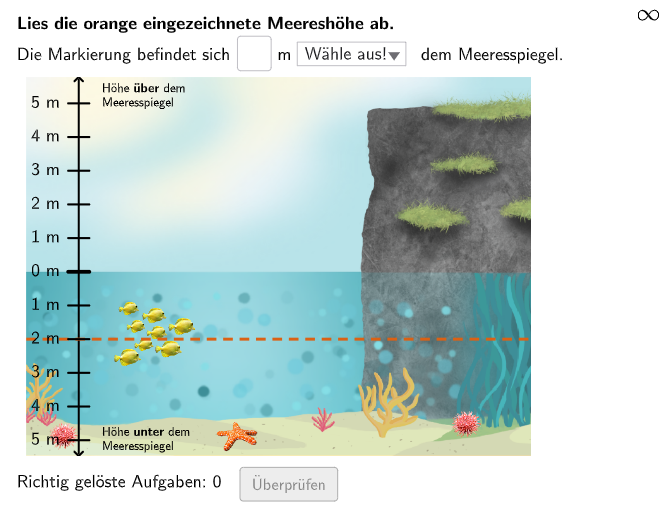
This GeoGebra example demonstrates how integers are represented and compared on a number line through the context of sea level heights. The core mathematical concepts include understanding, comparing, and ordering integers, especially interpreting positive and negative numbers in real-world situations like altitude. Construction highlights involve using commands such as Sequence, Segment, Line, Intersect, If, Element, Textfield, Point, PolyLine, and Polygon to build the number line and interactive question elements, with objects like txtQuestion01, btnValidate, dropdown, and feedback mechanisms. It is suitable for grades 5-6 students to develop number sense and integer skills, and can be shared via GeoGebra Classroom for practice.
GeoGebra Commands & Parameters
Sequence(RandomElement[Join[{2…3, -5…-1, Remove[-5…5, {0}]}]], k, 1, 100) → HeightList, {-2, -4, -5, -2, -1, -1, 1, -3, -2, -2, -2, 3, 4, -1, 2, -1, -2, 1, -5, -2, 2, -2, 2, -4, -3, -1, -1, 1, 3, 2, -3, -4, -4, 2, 2, 2, 2, -3, -3, 2, -1, 5, -1, -2, -2, -2, 1, 2, -3, 1, 2, 4, -5, 5, -3, -5, 3, -3, 5, 5, 5, -5, 3, -5, -3, 4, -4, 2, -2, 4, 2, 3, -4, 4, 3, -4, -2, -5, -5, -3, -4, -3, 2, -3, -5, -4, 4, -2, -1, 5, -1, -5, 2, 2, -1, 2, -3, -2, 1, -1}Segment(PosImg11 + (1.25, 0), PosImg11 + (1.25, 9)) → seg1Sequence(Point[seg1, 0] + (0, 0.375) + (k * (0, 0.8)), k, 0, 10) → PosListLine(PosImg11 + (1.25, 0), PosImg11 + (1.25, 9)) → ax1Intersect(seg02, ax1) → PointPIf(Case ≟ 1, correct1 ∧ correctdd, correct2) → correctSequence(Random[1, 10], i, 1, 10) → randomNumbers, {9, 8, 1, 4, 6, 7, 3, 9, 3, 6}Element(randomNumbers, Mod[questionCount, Length[randomNumbers]] + 1) → randomNumberSequence(Segment[PosList(k) + (-0.25, 0), PosList(k) + (0.25, 0)], k, 1, 11) → SegListSequence(Text[(("$\textsf{" * abs(k)) * " m}$"), PosList(k + 6) + (-0.25, 0.09), false, true, -1, 0], k, -5, 5) → CapListTextfield(input1) → InputBox1Segment(PosList(pos) + (-1.25, 0), PosList(pos) + (10.75, 0)) → seg01Sequence(Segment[PosList(k) + (-1.25, 0), PosList(k) + (10.75, 0)], k, 1, 11) → SegList2Point(PosList) → PointAPolyLine(PointA + {(-1.25, 0), (10.75, 0)}) → seg03Polygon(Corner[pic1, 1], Corner[pic1, 2], Corner[pic1, 3], Corner[pic1, 4]) → poly1, segpoly11, segpoly12, segpoly13, segpoly14If(Case ≟ 1, Defined[input1] ∧ SelectedIndex[dropdown] ≠ 1, attemptCount > 1, moved, true) → clickableBtnValidateSegment(PosList(pos) + (-1.25, 0), PosList(pos) + (10.75, 0)) → segSol2
AI Drawing Prompt Reference
Draw a vertical reference line, then generate multiple equally spaced points that represent sea-level integer heights. Map each height to a position along a horizontal number-line style layout, placing positive and negative values on opposite sides of the baseline. Add a text label for each integer height showing the absolute value followed by “m”. Include a long horizontal segment acting as the interactive answer area. Finally, place an input field for the user’s response and a validation button with a dropdown choice to practice comparing and ordering integers.
The prompt above was compiled from the original drawing commands and is for reference only.