
Scored Practice on Reflection in an Axis
Loading the math board and drawing, please wait…
In collections
Geometry Transformation
Maths for 8th Grade Units 1 to 3
Learn with Lindy: Transformations Intro
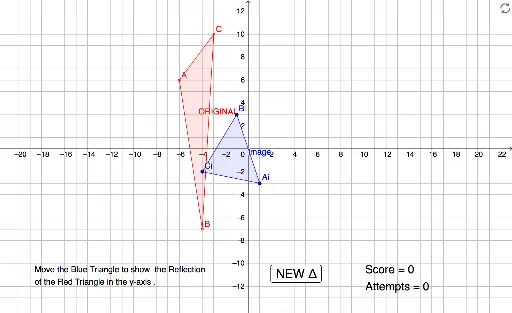
This interactive GeoGebra example provides a scored practice session on reflecting geometric figures across coordinate axes. It demonstrates the concept of axial symmetry (reflection) in a two-dimensional plane, where a randomly generated polygon is mirrored over either the x-axis or y-axis. The construction uses the Random command to generate vertices, If to decide the reflection axis, Polygon to build the original shape, and creates the reflected image accordingly. Variables such as score and try track the user's performance, while text objects display feedback. This resource is suitable for middle or high school students learning geometric transformations, serving as both a self-assessment tool and a classroom demonstration to reinforce understanding of reflection properties.
GeoGebra Commands & Parameters
Random(0, 1) → xoryPolygon(A, B, C) → ORIGINAL, c, a, bIf(xory ≟ 0, (x(B), (-y(B))), ((-x(B)), y(B))) → EIf(xory ≟ 0, (x(C), (-y(C))), ((-x(C)), y(C))) → FIf(xory ≟ 0, (x(A), (-y(A))), ((-x(A)), y(A))) → DPolygon(Ai, Bi, Ci) → Image, i, g, hIf(Ai ≟ D ∧ Bi ≟ E ∧ Ci ≟ F, 1, 0) → addIf(xory ≟ 0, "x-axis", "y-axis") → axis
AI Drawing Prompt Reference
Randomly generate a polygon and reflect it across either the x-axis or y-axis to create a mirrored image, based on a random choice. Display both the original and reflected polygons, and label the axis used for reflection.
The prompt above was compiled from the original drawing commands and is for reference only.