
Scanning Volume Under a Surface
Loading the math board and drawing, please wait…
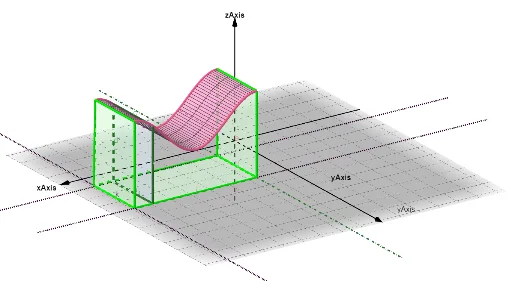
This example demonstrates how to visualize the volume under a surface through a dynamic scanning process. It constructs a three-dimensional surface and uses a series of planes or segments to scan the region beneath it, showing the accumulation of volume step by step. The core mathematical concepts involved are double integrals and volume calculation, including cross-sectional areas and the idea of integration. The construction uses GeoGebra commands such as Point, CurveCartesian, Polygon, Surface, Line, Intersect, and Segment to define the surface and boundaries, while sliders or dynamic objects (like a_1, b_1) control the scanning position to gradually fill the volume. This example is suitable for senior high school or early university students to understand multiple integrals, volume computation, and 3D visualization, and serves as an effective teaching aid for calculus demonstrations.
GeoGebra Commands & Parameters
Point(Segment[(π / 2, 1, 0), (((5 * π)) / 2, 1, 0)]) → ACurveCartesian(t, 1, sin(t) + 3, t, π / 2, ((5 * π)) / 2) → aCurveCartesian(t, 4, sin(t) + 3, t, π / 2, ((5 * π)) / 2) → bPolygon(A, B, C, D) → q1, a_1, b_1, c, dSurface((u * a(t)) + ((1 - u) * b(t)), t, π / 2, ((5 * π)) / 2, u, 0, 1) → eLine((π / 2, 1, 0), (((5 * π)) / 2, 1, 0)) → hLine((π / 2, 4, 0), (((5 * π)) / 2, 4, 0)) → iLine((π / 2, 1, 0), (π / 2, 4, 0)) → jLine((((5 * π)) / 2, 4, 0), (((5 * π)) / 2, 1, 0)) → kPoint(b) → FIntersect(k, h) → IIntersect(i, j) → KIntersect(i, k) → GPoint(h) → JPoint(a) → HPoint(b) → LSegment(J, H) → lPoint(a) → MSegment(M, I) → mSegment(F, G) → nSegment(L, K) → pIntersect(k, i) → OPoint(b) → PIntersect(j, i) → TIntersect(h, j) → UPoint(a) → VPoint(b) → SSegment(S, V) → sSegment(S, T) → tSegment(V, U) → f_1Polygon(S, V, U, T) → q3, s_1, v, u, t_2Point(k) → RPolygon(T, O, R, U) → q2, t_1, o, r, u_1Point(a) → QPolygon(Q, R, O, P) → q4, q, r_1, o_1, p_1
AI Drawing Prompt Reference
Create a 3D visualization showing the volume under a surface being scanned dynamically. A rectangular base lies in the horizontal plane, with two curved edges along the front and back, each following a sine wave elevated above the base. A surface spans between these curves. As a scanning plane moves from one end to the other, thin cross-sectional slices are revealed, each bounded by the surface above and the base below, gradually filling the entire volume. Include the base boundary, four vertical side edges, the curved surface, and multiple polygonal cross-sections that change shape with the scanning position, illustrating the accumulation of volume during integration.
The prompt above was compiled from the original drawing commands and is for reference only.