
Scaled Similar Triangles
Loading the math board and drawing, please wait…
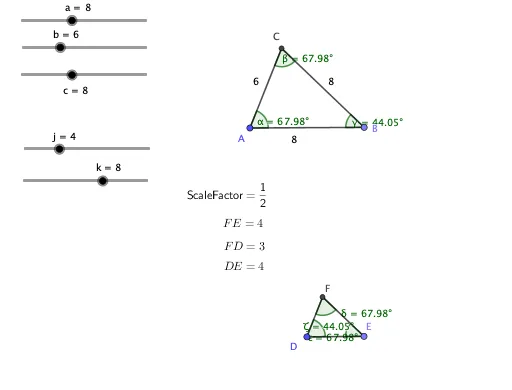
This example explores the properties of similar triangles by scaling them. Key mathematical concepts include the definition and properties of similar triangles. Using GeoGebra commands such as Circle, Point, Intersect, Segment, etc., the scaling process of triangles can be dynamically demonstrated. Suitable for middle school and above students to learn about similar triangles.
GeoGebra Commands & Parameters
Circle(A, a) → dPoint(d) → BCircle(A, b) → eCircle(B, c) → fIntersect(e, f, 1) → CSegment(A, C) → gSegment(C, B) → hSegment(B, A) → iCircle(D, l) → pPoint(p) → ESegment(D, E) → qCircle(D, m) → rCircle(E, n) → sIntersect(r, s, 1) → FSegment(D, F) → tSegment(F, E) → f_1FractionText(l) → text1FractionText(m) → text2FractionText(n) → text3FractionText(j / k) → text4Angle(B, A, C) → αAngle(A, C, B) → βAngle(C, B, A) → γAngle(E, D, F) → δAngle(D, F, E) → εAngle(F, E, D) → ζ
AI Drawing Prompt Reference
Draw two similar triangles to demonstrate their scaling process dynamically. Start by drawing a circle and marking intersections to form one triangle side, then draw two more circles to complete the triangle. Next, draw three circles of different radii centered at a point, mark their intersections to form another similar triangle. Display the ratio of side lengths and the measures of all interior angles for both triangles, highlighting the properties of similar triangles.
The prompt above was compiled from the original drawing commands and is for reference only.