
Sara (Germany) – Polygon and Function Combined Construction
Loading the math board and drawing, please wait…
In collections
Polygons: first steps (GER)
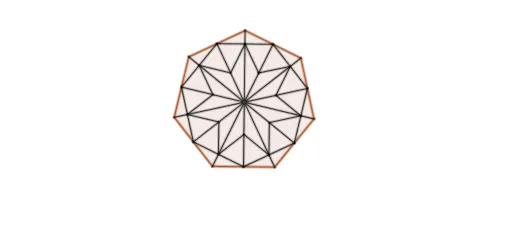
This example demonstrates a comprehensive geometric construction that combines polygons, midpoints, centroids, and function graphs, built using GeoGebra commands to create a complex figure with numerous points, segments, and polygon objects. The core mathematical concepts involve power functions, linear functions, fractions, and geometric properties such as centroids and midpoints. The construction uses commands like Polygon to create polygons, Midpoint to find midpoints, Segment to connect points, Centroid to compute centroids, and Intersect to find intersection points, defining many point objects (A, B, C, D, etc.) and function or segment objects (f, g, h, etc.), resulting in the figure named 'Sara (Germany)'. This is suitable for upper secondary or early university students to explore the interplay between geometry and functions, and can also serve as a teaching demonstration for combining geometric constructions with function graphing.
GeoGebra Commands & Parameters
Polygon(A, B, 7) → Vieleck1, f, E, F, G, g, h, i, j, k, l, C, DMidpoint(F, E) → HMidpoint(D, C) → IMidpoint(E, D) → JMidpoint(B, C) → KMidpoint(A, B) → LMidpoint(A, G) → MMidpoint(G, F) → NSegment(N, H) → mSegment(H, J) → nSegment(I, J) → pSegment(M, L) → qSegment(L, K) → rSegment(K, I) → sSegment(M, N) → tCentroid(Vieleck1) → OSegment(H, O) → aSegment(O, J) → bSegment(O, I) → cSegment(O, L) → dSegment(O, K) → eSegment(O, M) → f_1Segment(N, O) → g_1Segment(O, D) → h_1Segment(O, C) → i_1Segment(O, B) → j_1Segment(O, A) → k_1Segment(O, G) → l_1Segment(O, F) → m_1Segment(E, O) → n_1Midpoint(t) → PMidpoint(q) → QMidpoint(r) → SMidpoint(s) → TMidpoint(p) → UMidpoint(n) → VMidpoint(m) → WMidpoint(L, O) → RMidpoint(M, O) → ZMidpoint(N, O) → A_1Midpoint(H, O) → B_1Midpoint(J, O) → C_1Midpoint(O, I) → D_1Midpoint(O, K) → E_1Segment(A_1, W) → p_1Segment(W, B_1) → q_1Segment(B_1, V) → r_1Segment(V, F_1) → s_1Segment(F_1, C_1) → t_1Segment(F_1, U) → a_1Segment(U, D_1) → b_1Segment(D_1, T) → c_1Segment(T, E_1) → d_1Segment(E_1, S) → e_1Segment(S, R) → f_2Segment(R, Q) → g_2Segment(Q, Z) → h_2Segment(Z, P) → i_2Segment(P, A_1) → j_2Intersect(j, m) → G_1Intersect(f_1, g_1) → H_1Segment(G_1, H_1) → k_2
AI Drawing Prompt Reference
Draw a figure combining a polygon and function graphs. Start by drawing a polygon Vieleck1, then find the midpoints of its sides and connect them to form a new polygon. Next, calculate the centroid O of polygon Vieleck1 and connect it to the midpoints of its sides to form several segments. Finally, find the midpoints of these segments and connect them to form an even smaller polygon.
The prompt above was compiled from the original drawing commands and is for reference only.