
SAA Congruence Shortcut Investigation
Loading the math board and drawing, please wait…
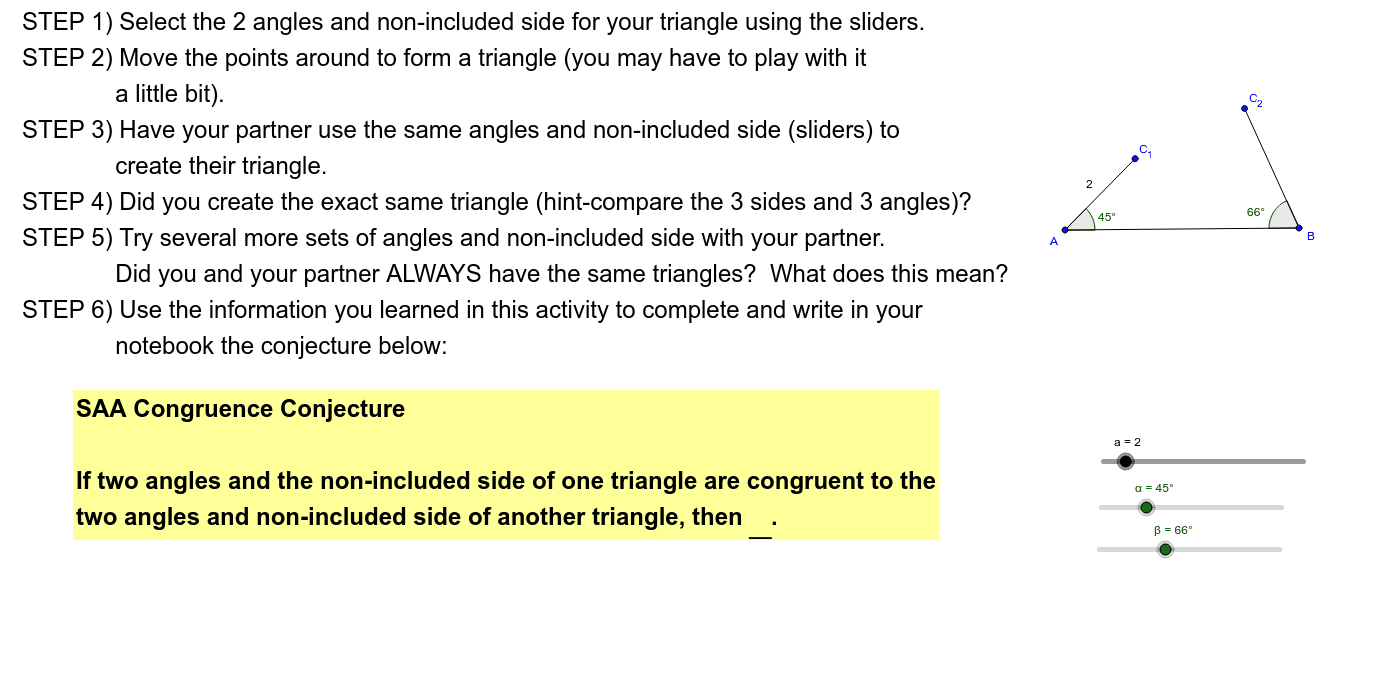
This example demonstrates the concept of triangle congruence using the SAA postulate (Angle-Angle-Side). It involves core math concepts like triangle congruence criteria, angle measurement, and geometric transformations. Constructed using GeoGebra commands such as Circle, Segment, Rotate, Ray, Intersect, Angle, Point, and Polygon. Ideal for high school students to understand congruence theorems and practice geometric constructions.
GeoGebra Commands & Parameters
Circle(A, B) → cSegment(A, B) → bCircle(A, a) → dRotate(B, α, A) → B'Ray(A, B') → eIntersect(d, e, 1) → C_1Angle(B, A, C_1) → γRotate(A, (-β), B) → A'Ray(B, A') → fPoint(f) → C_2Segment(B, C_2) → gSegment(A, C_1) → hAngle(A, B, C_2) → δSegment(C_2, C_1) → kPolygon(C_1, A, B) → poly1, b_1, c_1, a_1Angle(A, C_1, B) → ε
AI Drawing Prompt Reference
Draw triangle ABC with angle BAC equal to angle A'B'C' and angle ABC equal to angle B'A'C', and side AC equal to side A'C'. Start by drawing line segment AB, then draw a circle with center A and radius AB. Next, rotate point B around A to get point A', draw ray BA', and find the intersection of circle d and ray e to get point C'. Then, draw angles BAC' and ABC', and finally connect points B and C', A and C', to form triangle ABC.
The prompt above was compiled from the original drawing commands and is for reference only.