
Rotational Symmetry of a Square by kherdegen
Loading the math board and drawing, please wait…
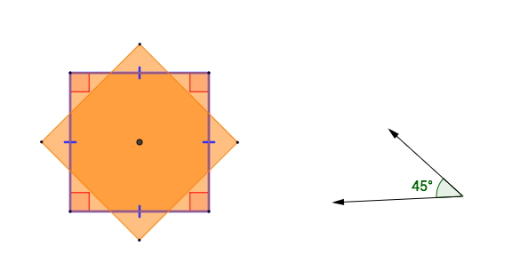
① This example dynamically rotates a square to demonstrate its rotational symmetry: the square coincides with itself after rotations of 90°, 180°, and 270° about its center. ② Core mathematical concepts include rotational symmetry, symmetry axes, geometric transformations, and properties of polygons. ③ Construction highlights: using GeoGebra commands such as Segment, OrthogonalLine, Circle, Intersect, Angle, Polygon, Vector, and Rotate, the square and its rotated copies are constructed, with rotation angles (α, β, γ, δ) and corresponding vertices (A', B', C', D') labeled. ④ Suitable for middle school geometry to understand rotational symmetry and congruence, and as an intuitive introduction to transformation matrices in high school analytic geometry.
GeoGebra Commands & Parameters
Segment(A, B) → fOrthogonalLine(A, f) → gCircle(A, Segment[A, B]) → cCircle(B, Segment[A, B]) → dIntersect(c, g, 1) → CCircle(C, Segment[A, B]) → eIntersect(d, e, 1) → DSegment(C, D) → hSegment(D, B) → iSegment(A, C) → jAngle(A, B, D) → αAngle(B, D, C) → βAngle(D, C, A) → γAngle(C, A, B) → δPolygon(A, B, D, C) → poly1, a, b, d_1, c_1Vector(F, H) → uVector(F, I) → vAngle(I, F, H) → εSegment(A, D) → kSegment(B, C) → lIntersect(k, l) → ERotate(A, ε, E) → A'Rotate(B, ε, E) → B'Rotate(D, ε, E) → D'Rotate(C, ε, E) → C'Polygon(A', B', D', C') → poly1', a', b', d', c'
AI Drawing Prompt Reference
Draw a square and demonstrate its rotational symmetry. Construct the square first, then add a slider to control the rotation angle. Rotate the square by that angle around its center, creating rotated copies, and label the corresponding vertices before and after rotation. Also draw the two diagonals of the square and mark their intersection as the rotation center. By adjusting the slider, observe that the square coincides with itself at 90, 180, and 270 degrees, illustrating rotational symmetry.
The prompt above was compiled from the original drawing commands and is for reference only.