
Rotation Shortcuts: Demonstrating Rotation of Polygons and Points
Loading the math board and drawing, please wait…
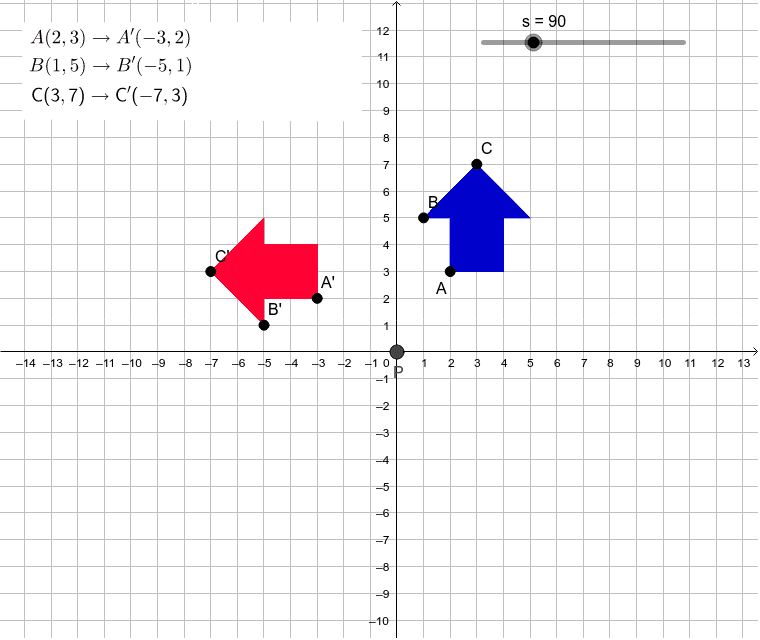
① This GeoGebra example demonstrates the rotation of a polygon along with its interior points and segments around a center, using shortcut commands to visualize the transformed figure. ② The core mathematical concept is rotation transformation in plane geometry, involving the center of rotation, rotation angle, and the correspondence between original and rotated points, segments, and polygons, while preserving distances (e.g., the distance from point P to point A remains unchanged after rotation). ③ Construction highlights: Based on the construction summary, the example uses GeoGebra commands such as Point, Polygon, Rotate, and Distance. It creates multiple points (P, A, I, B, C, etc.), a polygon poly2, and several segments (h, i, j, etc.), then applies the Rotate command to generate rotated counterparts (A', I', poly2', etc.). The Distance command is used to compute and display the distances distancePA and distancePA' before and after rotation, with text objects (text1, text2, etc.) for labeling. ④ This is suitable for middle or high school geometry teaching or self-study, helping learners understand properties of rotation, and also serves as a GeoGebra operation exercise for mastering rotation commands and dynamic demonstration techniques.
GeoGebra Commands & Parameters
Point(Circle[A, 2]) → IPolygon(A, I, B, C, L, M, N) → poly2, h, i, j, k, l, m, nRotate(A, s°, P) → A'Rotate(I, s°, P) → I'Rotate(B, s°, P) → B'Rotate(C, s°, P) → C'Rotate(L, s°, P) → L'Rotate(M, s°, P) → M'Rotate(N, s°, P) → N'Polygon(A', I', B', C', L', M', N') → poly2', h', i', j', k', l', m', n'Distance(P, A) → distancePADistance(P, A') → distancePA'Polygon(D, E, F, G) → poly1, d, e, f, g
AI Drawing Prompt Reference
Draw a dynamic illustration showing the rotation of a polygon along with its interior points and segments around a center point, highlighting the correspondence and distance preservation between original and rotated figures. Create a center point and a polygon, then use a slider to control the rotation angle, rotating the polygon, internal points, and segments around the center. Display the original and rotated figures, and show the distances between corresponding points before and after rotation, with text labels.
The prompt above was compiled from the original drawing commands and is for reference only.