
Rotation and Translation by GeoGebra Institute of Hong Kong
Loading the math board and drawing, please wait…
In collections
Symmetry, Transformation and Tessellation
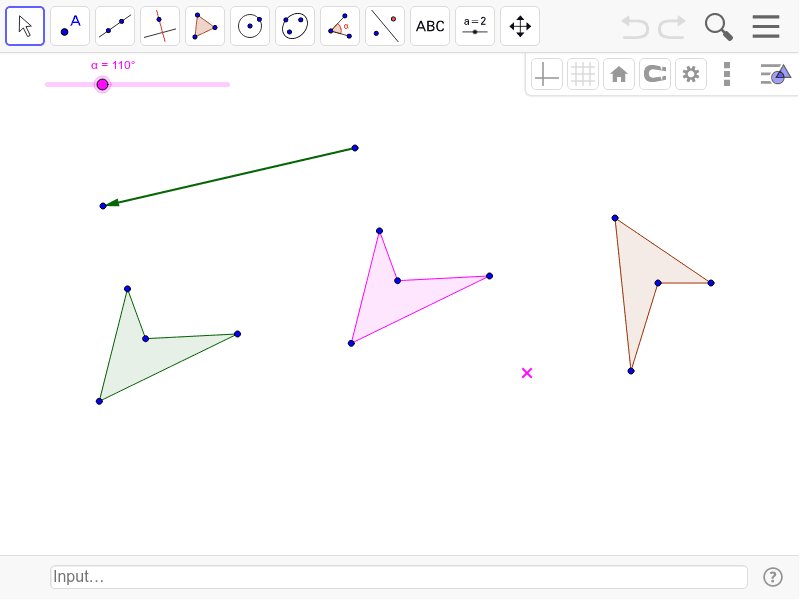
This example demonstrates the dynamic effects of plane figures under rotation and translation transformations. Core math concepts include transformation, vector, angle, and polygon. It uses GeoGebra commands like Polygon, Vector, Rotate, and Translate to construct the shapes and their transformed versions. Suitable for high school students learning geometric transformations to understand their properties and applications.
GeoGebra Commands & Parameters
Polygon(A, B, C, D) → poly1, a, b, c, dVector(F, G) → uRotate(A, α, E) → A'Rotate(B, α, E) → B'Rotate(C, α, E) → C'Rotate(D, α, E) → D'Polygon(A', B', C', D') → poly1', a', b', c', d'Translate(A', u) → A''Translate(B', u) → B''Translate(C', u) → C''Translate(D', u) → D''Polygon(A'', B'', C'', D'') → poly1'', a'', b'', c'', d''
AI Drawing Prompt Reference
Draw a quadrilateral, then create a vector. Rotate the quadrilateral by a certain angle using the vector to form a new quadrilateral, and translate this new quadrilateral along the vector to create another one, showing the effects of rotation and translation.
The prompt above was compiled from the original drawing commands and is for reference only.