
Rotation 180 Degrees: Symmetric Transformations of Polygons and Solids
Loading the math board and drawing, please wait…
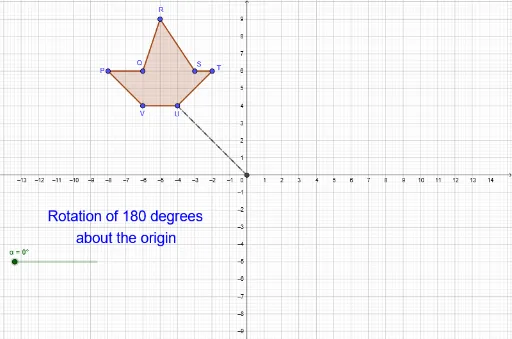
①This example demonstrates rotating a planar polygon by 180 degrees about a point to obtain a symmetric figure, and also shows the application of rotation to 3D solids (cylinder, cuboid), scatter plots, and piecewise functions.②The core mathematical concept is rotational transformation, specifically central symmetry (180-degree rotation), involving angles, rotation center, congruence of figures, and coordinate transformations.③Construction highlights: using GeoGebra commands such as Polygon, Intersect, Segment, Rotate, CircleArc, and Angle; objects include original points (R,Q,P, etc.) and rotated points (R',Q',P', etc.), the rotated polygon poly1', as well as cylinder, cuboid, and scatter plot elements.④Suitable for middle school geometry teaching to visualize central symmetry and rotation, and also for introductory analytic geometry or computer graphics in university to understand coordinate rotation formulas.
GeoGebra Commands & Parameters
Polygon(R, Q, P, V, U, T, S) → poly1, a, b, c, d, e, f, gIntersect(xAxis, yAxis) → ASegment(U, A) → hRotate(R, (-α), A) → R'Rotate(Q, (-α), A) → Q'Rotate(P, (-α), A) → P'Rotate(V, (-α), A) → V'Rotate(U, (-α), A) → U'Rotate(T, (-α), A) → T'Rotate(S, (-α), A) → S'Polygon(R', Q', P', V', U', T', S') → poly1', r', q', p', v', u', t', s'Segment(A, U') → iCircleArc(A, U', U) → kCircleArc(A, R', R) → pCircleArc(A, Q', Q) → qAngle(U', A, U) → β