
Rotating a Rectangle
Loading the math board and drawing, please wait…
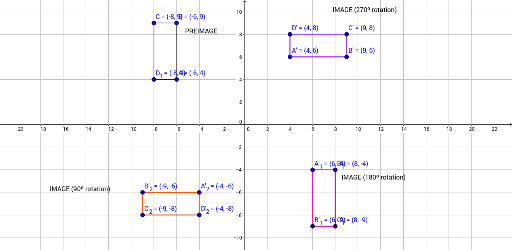
This example demonstrates the rotation of a rectangle. The key mathematical concept involved is geometric transformation, specifically rotation. Using GeoGebra commands such as Segment, the construction of a rectangle and its rotation is illustrated. Suitable for students at the junior high school level and above.
GeoGebra Commands & Parameters
Segment(B, C) → fSegment(B, A) → gSegment(C, D_1) → hSegment(D_1, A) → iSegment(A'_1, D'_1) → jSegment(D'_1, C'_1) → kSegment(C'_1, B'_1) → lSegment(A'_1, B'_1) → mSegment(B'_2, A'_2) → nSegment(A'_2, D'_2) → pSegment(D'_2, C'_2) → qSegment(C'_2, B'_2) → rSegment(D', A') → sSegment(A', B') → tSegment(B', C') → aSegment(C', D') → b
AI Drawing Prompt Reference
Draw a rectangle and then rotate it around a point. First, draw the four sides of the rectangle. Then, create a slider to control the rotation angle. Finally, use the rotation command to rotate each vertex of the rectangle around the point specified by the slider, forming a new rectangle.
The prompt above was compiled from the original drawing commands and is for reference only.