
Rotating a Cube
Loading the math board and drawing, please wait…
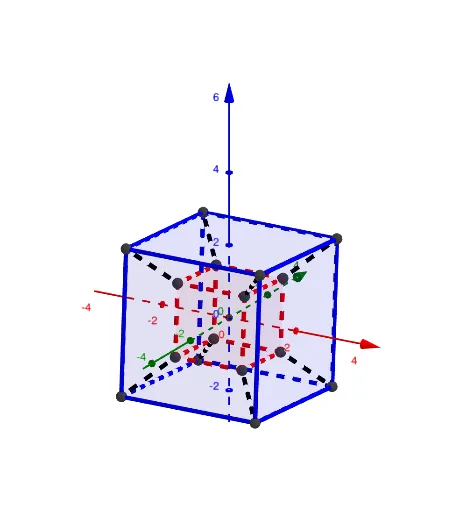
This example demonstrates the rotation of a cube in three-dimensional space, highlighting the relationship between the rotation axis, rotation angle, and edge length. Key mathematical concepts include geometric transformations, coordinate geometry, and solid geometry. Construction involves using GeoGebra commands such as Dilate, PT, Polygon, and Segment to create the rotated cube. Suitable for high school students or college freshmen to learn geometric transformations and spatial visualization skills.
GeoGebra Commands & Parameters
Dilate((Element[m1, 1, 1], Element[m1, 2, 1], Element[m1, 3, 1]), 1 + Element[m1, 4, 1]) → APT(((((((Rzw * Ryw) * Rxw) * Rxz) * Ryz) * Rxy) * m1)) → A'PT(m2) → BPT(((((((Rzw * Ryw) * Rxw) * Rxz) * Ryz) * Rxy) * m2)) → B'PT(mC) → CPT(((((((Rzw * Ryw) * Rxw) * Rxz) * Ryz) * Rxy) * mC)) → C'PT(mD) → DPT(((((((Rzw * Ryw) * Rxw) * Rxz) * Ryz) * Rxy) * mD)) → D'Polygon(A', B', C', D') → q1, a', b', c', d'PT(mAb) → AbPT(((((((Rzw * Ryw) * Rxw) * Rxz) * Ryz) * Rxy) * mAb)) → Ab'PT(mBb) → BbPT(((((((Rzw * Ryw) * Rxw) * Rxz) * Ryz) * Rxy) * mBb)) → Bb'Polygon(A', B', Bb', Ab') → q2, f, g, bb', ab'PT(mCb) → CbPT(((((((Rzw * Ryw) * Rxw) * Rxz) * Ryz) * Rxy) * mCb)) → Cb'Polygon(C', B', Bb', Cb') → q3, h, i, j, cb'PT(mDb) → DbPT(((((((Rzw * Ryw) * Rxw) * Rxz) * Ryz) * Rxy) * mDb)) → Db'Polygon(C', D', Db', Cb') → q4, k, l, db', mPolygon(A', D', Db', Ab') → q5, n, p, q, rPolygon(Bb', Cb', Db', Ab') → q6, s, t, a, bPT(mAi) → AiPT(((((((Rzw * Ryw) * Rxw) * Rxz) * Ryz) * Rxy) * mAi)) → Ai'PT(mBi) → BiPT(((((((Rzw * Ryw) * Rxw) * Rxz) * Ryz) * Rxy) * mBi)) → Bi'Segment(Ai', A') → cPT(mCi) → CiPT(((((((Rzw * Ryw) * Rxw) * Rxz) * Ryz) * Rxy) * mCi)) → Ci'PT(mDi) → DiPT(((((((Rzw * Ryw) * Rxw) * Rxz) * Ryz) * Rxy) * mDi)) → Di'Segment(Bi', B') → dSegment(Ci', C') → eSegment(Di', D') → f_1Polygon(Ai', Bi', Ci', Di') → q7, ai', bi', ci', di'PT(mAib) → AibPT(((((((Rzw * Ryw) * Rxw) * Rxz) * Ryz) * Rxy) * mAib)) → Aib'Segment(Aib', Ab') → g_1PT(mBib) → BibPT(((((((Rzw * Ryw) * Rxw) * Rxz) * Ryz) * Rxy) * mBib)) → Bib'Segment(Bib', Bb') → h_1Polygon(Ai', Bi', Bib', Aib') → q8, i_1, j_1, bib', aib'PT(mCib) → CibPT(((((((Rzw * Ryw) * Rxw) * Rxz) * Ryz) * Rxy) * mCib)) → Cib'Segment(Cib', Cb') → k_1Polygon(Ci', Bi', Bib', Cib') → q9, l_1, m_1, n_1, cib'PT(mDib) → DibPT(((((((Rzw * Ryw) * Rxw) * Rxz) * Ryz) * Rxy) * mDib)) → Dib'Segment(Dib', Db') → p_1Polygon(Ci', Di', Dib', Cib') → q10, q_1, r_1, dib', s_1Polygon(Ai', Di', Dib', Aib') → q11, t_1, a_1, b_1, c_1Polygon(Bib', Cib', Dib', Aib') → q12, d_1, e_1, f_2, g_2
AI Drawing Prompt Reference
Draw a cube rotating in 3D space. Start with an original cube defined by eight vertices, four on top and four on bottom. Rotate each vertex around a spatial axis by a certain angle to get corresponding rotated vertices. Connect each original vertex to its rotated counterpart with a line segment to show the rotation path. Then connect the rotated vertices to form the rotated cube's top, bottom, and side faces. Also outline the original cube with dashed or thin lines for comparison. The final image is a transparent wireframe model highlighting the rotation axis, angle, and edge length relationship.
The prompt above was compiled from the original drawing commands and is for reference only.