
Right Triangle Template: Dynamic Geometry Construction with Multi-Concept Integr
Loading the math board and drawing, please wait…
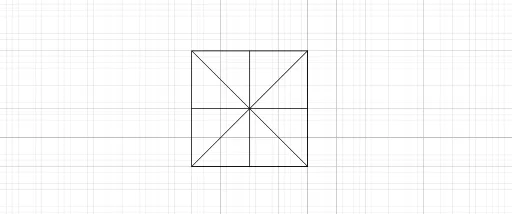
① This example presents an interactive right triangle template in GeoGebra, demonstrating the fundamental structure of a right triangle and its derived elements in a dynamic geometry environment. ② Core mathematical concepts include properties of right triangles, relationships between polygons and segments, midpoints and symmetry, as well as implicit connections to multiplication, linear programming, limits, and tree diagrams, showcasing the flexibility of mathematical modeling. ③ Construction highlights: Using GeoGebra commands Polygon, Segment, and Midpoint, the template builds the base figure with objects such as L_1, M_1, poly1, m_2, n_2, p_2, q_2, N_1, O_1, s_2, a_2, P_1, Q_1, R_1, S_1, b_2, c_2, which together form the right triangle, auxiliary lines, midpoint markers, and potential dynamic parameters. ④ Suitable for middle and high school mathematics teaching, this template is ideal for explaining geometric concepts, dynamic demonstrations, exploring right triangle properties, and serving as a visual aid for interdisciplinary projects such as linear programming or probability tree diagrams.
GeoGebra Commands & Parameters
Polygon(L_1, M_1, 4) → poly1, m_2, n_2, p_2, q_2, N_1, O_1Segment(L_1, N_1) → s_2Segment(O_1, M_1) → a_2Midpoint(L_1, O_1) → P_1Midpoint(N_1, M_1) → Q_1Midpoint(m_2) → R_1Midpoint(p_2) → S_1Segment(P_1, Q_1) → b_2Segment(S_1, R_1) → c_2
AI Drawing Prompt Reference
Draw a right triangle template with its three sides, midpoints, and auxiliary lines. First, draw the three sides of the right triangle, then find the midpoints of the two legs, and draw the corresponding midlines, finally draw the midline on the hypotenuse.
The prompt above was compiled from the original drawing commands and is for reference only.