
Right Circular Cylinder Construction and Geometry
Loading the math board and drawing, please wait…
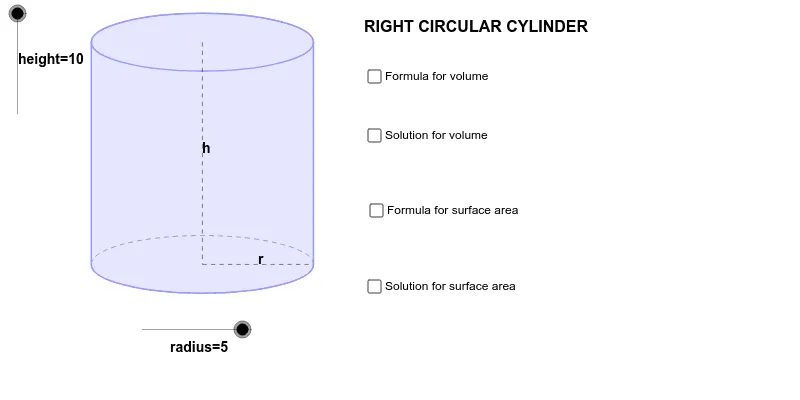
This GeoGebra example demonstrates the three-dimensional construction of a right circular cylinder, visually illustrating how a cylinder is generated from a rectangle rotating around an axis. Core mathematical concepts include the definition of a cylinder, its circular bases, height, lateral surface, and properties such as surface area and volume. The construction uses GeoGebra commands such as Dilate, Vector, Translate, Arc, Polygon, Segment, and Midpoint, along with objects like radius, height, A, B, P, L, R, C, to build the base circles, lateral surface, and axis. Suitable for middle and high school solid geometry lessons, this example helps students understand spatial structures, solids of revolution, and related geometric calculations, and can also serve as a visual aid in introductory college geometry courses.
GeoGebra Commands & Parameters
Dilate(B, height, A) → CVector(A, C) → uTranslate(c, u) → dTranslate(R, u) → DTranslate(P, u) → ETranslate(L, u) → FArc(d, 0, 3.141592653589793) → eArc(c, 3.141592653589793, 0) → fPolygon(F, D, R, L) → Q, f_1, d_1, r_1, lSegment(E, P) → aSegment(P, R) → bMidpoint(E, P) → GMidpoint(P, R) → H
AI Drawing Prompt Reference
Draw a 3D right circular cylinder to illustrate its generation from a rotating rectangle. Start with a base circle defined by a center and radius, then translate this circle vertically to create the top circle, and connect corresponding points to form the lateral surface. Include the axis by connecting the centers of the two bases, and mark the radius and height as line segments. Use semicircular arcs for the visible parts of the bases, and a polygon to represent the unfolded lateral rectangle. Label key points such as the base center, top center, a point on the base circumference and its translated counterpart, and show midpoints for clarity.
The prompt above was compiled from the original drawing commands and is for reference only.