
Riemann Surface of Square Root
Loading the math board and drawing, please wait…
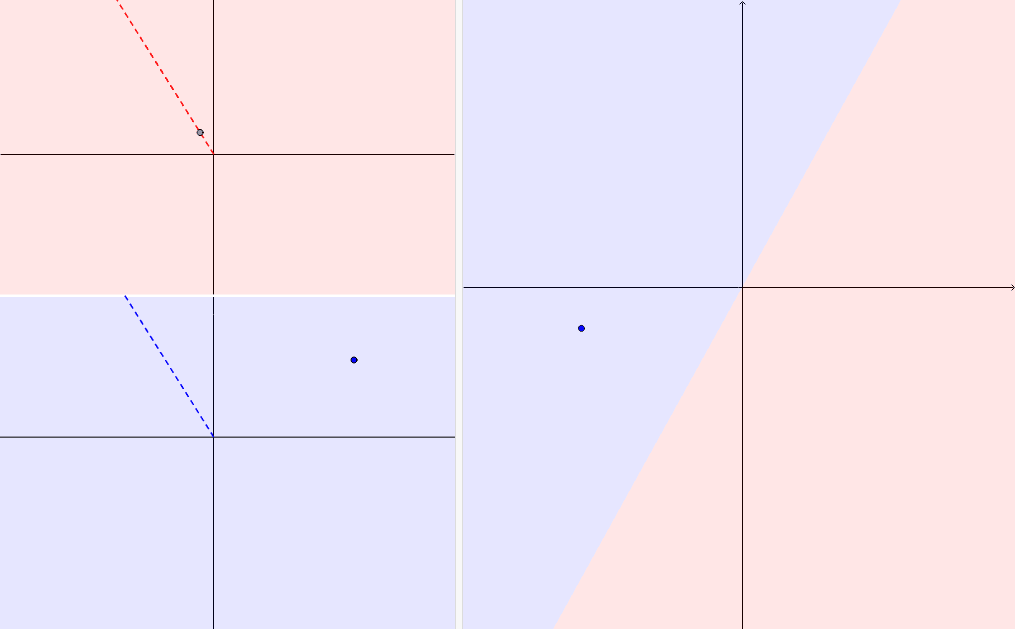
This applet demonstrates how the complex square root function can be considered as a 'univaluated function' on a 2-fold branched covering of the complex plane. It involves the concept of complex square roots and geometrically illustrates the branch covering properties of the square root function. Commands used include Point, Polygon, Ray, Intersect, Segment, Angle, Rotate, RaizPrincipal, CircleSector, etc., suitable for high school mathematics education and learning.
GeoGebra Commands & Parameters
Point(c) → CutPointPolygon((-40, -5.5), (40, -5.5), (40, 20), (-40, 20)) → polígono1, b, d, e, fRay(O, CutPoint) → cutRay(O2, CutPoint2) → cut2Polygon((-40, -5.5), (40, -5.5), (40, -30), (-40, -30)) → polígono2, g, h, i, jIntersect(cut2, polígono2) → Cutpoint'Intersect(cut, polígono1) → CutPoint2'Segment(O, CutPoint2') → cut'Segment(O2, Cutpoint') → cut2'Angle(C, O, CutPoint) → deltaRotate(A', π - delta) → A''RaizPrincipal(A'', 2) → DRotate(D, ((-(π - delta))) / 2) → D'Rotate(C, delta / 2) → C'Rotate(C', 3.141592653589793) → C''CircleSector(O, C', C'') → kCircleSector(O, C'', C') → pRotate(D', 3.141592653589793) → D''Rotate(CutPoint, 1.5707963267948966) → OrthAngle(C, O, A) → alpha
AI Drawing Prompt Reference
Draw a Riemann surface of the complex square root function. Start by drawing a center point O and two rays from O to different vertices of polygons. Then, draw two rectangular polygons representing upper and lower parts of the region. Find intersection points of rays with polygons to indicate branch points. Connect O with these intersection points to form line segments. Calculate angles and rotate points to create principal root points. Finally, draw circular sectors to show the geometric structure of the branch covering. This illustrates the branch covering properties of the square root function, suitable for mathematical education.
The prompt above was compiled from the original drawing commands and is for reference only.