
Richard Orthocenter: Dynamic Exploration of Triangle Orthocenter and Parametric
Loading the math board and drawing, please wait…
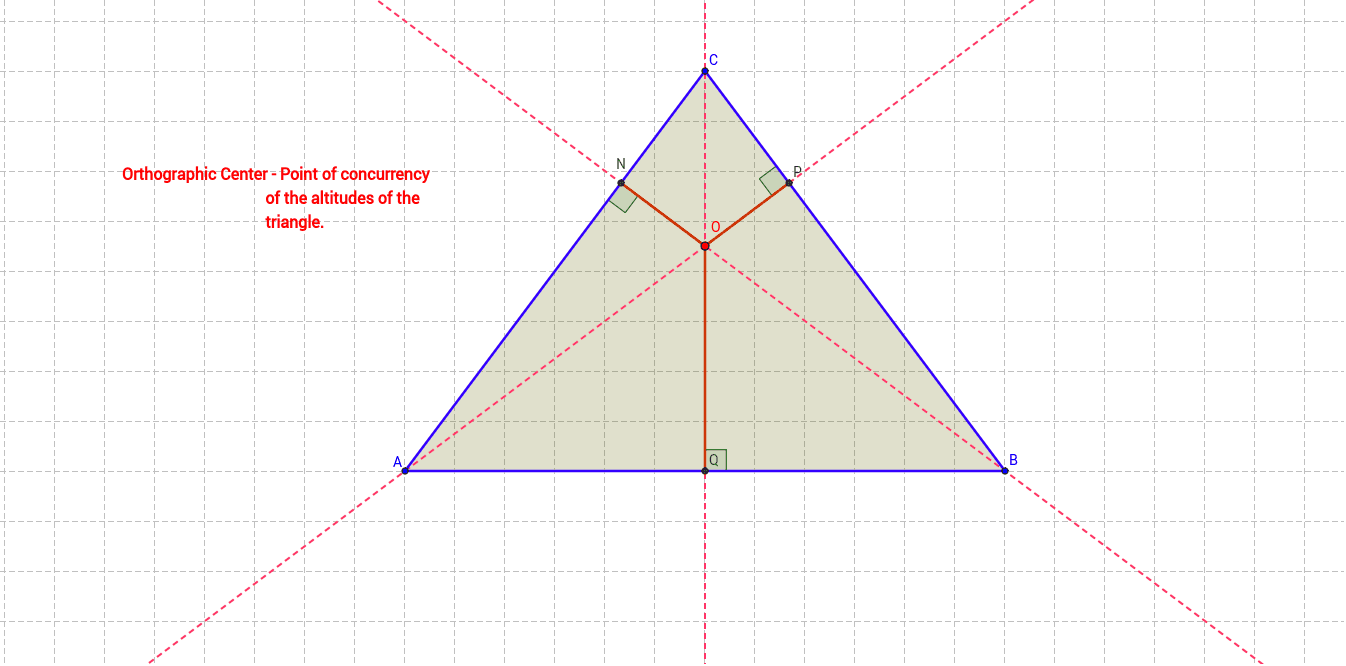
This GeoGebra example dynamically demonstrates the construction of the orthocenter of a triangle and its associated geometric properties, incorporating parametric curves and symmetry to explore the locus and logical relationships as the triangle changes. Core mathematical concepts include the orthocenter (intersection of altitudes), orthogonal lines, similar triangles, rational number ratios, and symmetry. Construction highlights: using Polygon to create triangle ABC, Circle and Intersect for auxiliary circles and points, Line and OrthogonalLine for altitudes, Angle and Segment for angle and segment labeling, and multiple points (D, E, F, G, H, I, J, K, L, M, N, O, P, Q) along with parametric curves (k, l, m) to visualize dynamic variations. Suitable for high school geometry, math competition training, or introductory college geometry, this example helps students intuitively grasp orthocenter properties and logical reasoning in geometric construction.
GeoGebra Commands & Parameters
Polygon(A, B, C) → poly1, c, a, bCircle(C, D) → dIntersect(d, c, 1) → EIntersect(d, c, 2) → FCircle(F, Segment[E, F]) → eCircle(E, Segment[F, E]) → fIntersect(e, f, 2) → GIntersect(e, f, 1) → HLine(G, H) → gIntersect(g, c) → IOrthogonalLine(B, b) → hOrthogonalLine(A, a) → iIntersect(g, h) → JOrthogonalLine(C, c) → jIntersect(h, b) → KIntersect(i, a) → LIntersect(j, c) → MAngle(B, K, C) → αAngle(A, K, B) → βAngle(C, M, A) → γAngle(C, L, A) → δAngle(B, M, C) → εIntersect(h, i) → OIntersect(h, b) → NIntersect(i, a) → PIntersect(j, c) → QSegment(N, O) → kSegment(O, P) → lSegment(O, Q) → m
AI Drawing Prompt Reference
Draw a dynamic triangle and construct its orthocenter. Start with a triangle, then draw altitudes from each vertex to the opposite side; their intersection is the orthocenter. On one side of the triangle, place two points and draw two circles centered at these points, intersecting each other; connect the two intersection points of the circles to form a line that crosses one side of the triangle. Inside the triangle, draw several auxiliary segments connecting the orthocenter to the feet of the altitudes, forming smaller triangles. Label multiple angles and show a few parametric curves to illustrate how the orthocenter's position changes as the triangle varies. The overall figure should clearly display the orthocenter, altitudes, feet, and angle relationships.
The prompt above was compiled from the original drawing commands and is for reference only.