
Rhombus Proofs: Geometric Construction and Visual Verification
Loading the math board and drawing, please wait…
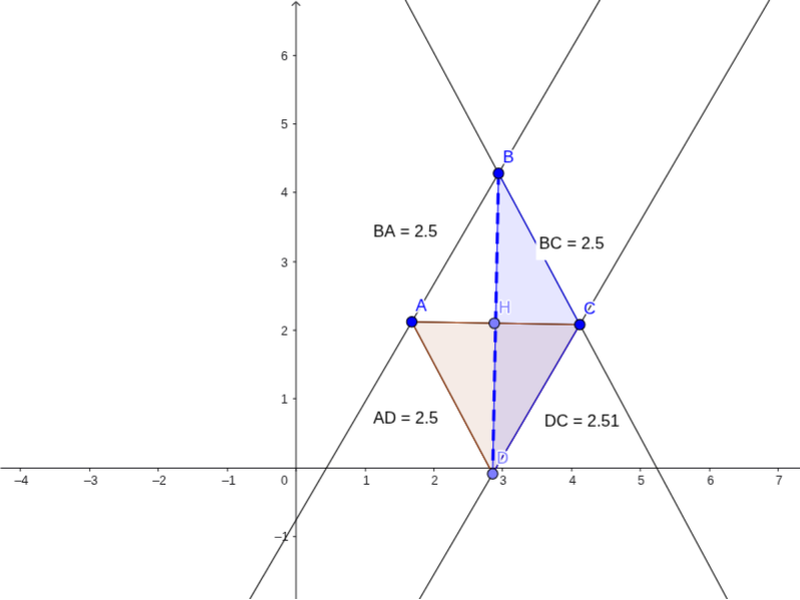
This GeoGebra example demonstrates the visual proof of the geometric properties of a rhombus through interactive construction. It shows how the equal side lengths and diagonal properties can be dynamically verified. Core mathematical concepts include the definition of a rhombus, properties of equal sides, perpendicular diagonals, and geometric proof techniques. The construction utilizes key GeoGebra commands such as `Line`, `Distance`, `Segment`, and `Polygon` to define vertices A, B, C, D, measure distances like distanceBA and distanceDC with text labels, and construct polygons poly1 and poly2. The `Intersect` command is used to find key intersection points E, F, G, H, facilitating the visual study of symmetry and geometric subdivisions. This resource is ideal for high school geometry courses, inquiry-based learning, and classroom demonstrations by teachers looking to make abstract proofs tangible.
GeoGebra Commands & Parameters
Line(A, B) → aLine(C, a) → bLine(B, C) → cDistance(B, C) → distanceBCDistance(B, A) → distanceBAPoint(b) → DSegment(A, D) → dDistance(A, D) → distanceADDistance(D, C) → distanceDCSegment(A, C) → ePolygon(A, D, C) → poly1, c_1, a_1, d_1Segment(B, D) → fPolygon(B, D, C) → poly2, c_2, b_1, d_2Intersect(e, d_1) → EIntersect(e, d_1) → FIntersect(e, d_1) → GPoint(e) → H
AI Drawing Prompt Reference
Draw a rhombus to demonstrate the equality of its sides and angles. Start by constructing two intersecting line segments, then use their intersection point as a center to draw two equal line segments, connecting these points to form the rhombus. Measure and label the lengths of the diagonals, and show their intersection point. Finally, divide the rhombus into four congruent right triangles using the diagonals to verify its symmetry and geometric properties.
The prompt above was compiled from the original drawing commands and is for reference only.