
Representing Fractions on a Number Line - Level 3 (FLINK Practice)
Loading the math board and drawing, please wait…
In collections
Zahlenstrahl und Ordnen von Brüchen
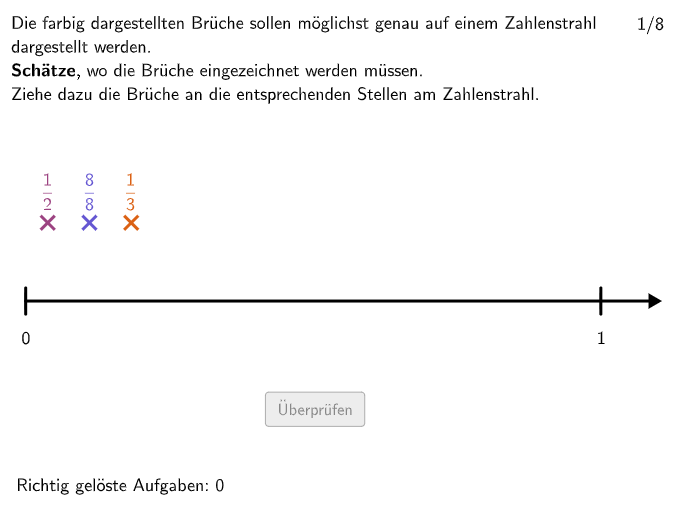
① This interactive GeoGebra example is designed for students in grades 5-6 to practice placing fractions, especially mixed numbers (whole number plus proper fraction), accurately on a number line. ② The core mathematical concepts are number sense and fraction operations, requiring students to interpret fractions as relative parts of a whole (the unit length on the number line) and to distinguish between numerator, denominator, and integer part. ③ Construction highlights: The applet uses GeoGebra commands such as Shuffle, Element, Polygon, Distance, If, Circle, Union, Sequence, IsInRegion, Segment, Textfield, and Text, along with objects like ZaehlerMatrix (numerator matrix), NennerMatrix (denominator matrix), questionCount, randomNosQuestion, Bruch1Pos (fraction 1 position), and StrahlRegion (ray region) to randomly generate fractions and segment the number line dynamically. ④ It is suitable for grades 5-6 as classroom practice or homework, helping students solidify their understanding of fraction representation on a number line, develop number sense, and practice fraction operations. It can also be used by teachers for demonstration or by students for self-paced exploration.
GeoGebra Commands & Parameters
Shuffle({1, 2, 3, 4, 5, 6, 7, 8}) → randomNosQuestion, {4, 1, 8, 3, 5, 6, 2, 7}Element(randomNosQuestion, questionCount) → questionNumElement(NennerMatrix, questionNum, 3) → nenner3Element(ZaehlerMatrix, questionNum, 3) → zaehler3Element(GanzeMatrix, questionNum, 3) → ganze3Element(GanzeMatrix, questionNum, 2) → ganze2Element(NennerMatrix, questionNum, 2) → nenner2Element(ZaehlerMatrix, questionNum, 2) → zaehler2Element(ZaehlerMatrix, questionNum, 1) → zaehler1Element(NennerMatrix, questionNum, 1) → nenner1Element(GanzeMatrix, questionNum, 1) → ganze1Polygon(StrahlRegionE1, StrahlRegionE2, StrahlRegionE3, StrahlRegionE4) → StrahlRegion, strahlregione1, strahlregione2, strahlregione3, strahlregione4Distance(StrahlEndPL, StrahlEndPR) → laengestrahlIf(questionNum ∈ {3, 5, 6, 7}, 2, 1) → maxganzeShuffle(Sequence[i, i, 1, (nenner * maxganze)]) → ZaehlerListe1, {2, 1}Circle(Bruch3Punkt, 0.3) → CircleFrac3Circle(Bruch2Punkt, 0.3) → CircleFrac2Circle(Bruch1Punkt, 0.3) → CircleFrac1Union(Sequence[StrahlEndPL + ((laengestrahl / maxganze, 0) * i), i, 0, maxganze], Sequence[(10, (-1 * i)), i, 1, 15]) → UnterteilungenGanzeSequence(Element[UnterteilungenGanze, i + 1], i, 0, maxganze + 5) → GanzePunkteIf(nenner ∈ {2, 3, 4}, 2, 1) → minstrahlgrenzeIf(nenner ≟ 2, 5, If[nenner ≟ 3 ∨ nenner ≟ 4, 4, If[nenner ∈ {5, 6, 7}, 2, If[nenner ≟ 8 ∨ nenner ≟ 9, 1.5, 1.1]]]) → maxstrahlgrenzeIsInRegion(Bruch2Pos, CircleFrac2) → bruch2correctIsInRegion(Bruch3Pos, CircleFrac3) → bruch3correctIsInRegion(Bruch1Pos, CircleFrac1) → bruch1correctPolygon(PtopLeftCornerFeedback, PtopRightCornerFeedback, PbottomRightCornerFeedback, PbottomLeftCornerFeedback) → rectangleCorrect, ptopleftcornerfeedback, ptoprightcornerfeedback, pbottomrightcornerfeedback, pbottomleftcornerfeedbackUnion(Sequence[StrahlEndPL + (unterteilungsvektor * i), i, 0, (unterteilungen * maxganze)], Sequence[(10, (-1 * i)), i, 1, 15]) → UnterteilungenPunkteSegment(StrahlEndPL, StrahlEndPInf) → ZahlenStrahlPolygon(VR1E1, VR1E2, VR1E3, VR1E4) → VR1, vr1e1, vr1e2, vr1e3, vr1e4Polygon(VR2E1, VR2E2, VR2E3, VR2E4) → VR2, vr2e1, vr2e2, vr2e3, vr2e4Polygon(VR3E1, VR3E2, VR3E3, VR3E4) → VR3, vr3e1, vr3e2, vr3e3, vr3e4Distance(Corner[SolText1, 1], Corner[SolText1, 2]) → BreiteSolText1Distance(Corner[SolText2, 1], Corner[SolText2, 2]) → BreiteSolText2Distance(Corner[SolText3, 1], Corner[SolText3, 2]) → BreiteSolText3Textfield(unterteilungeninput) → InputBoxUnterteilungenShuffle({1, 2}) → modus, {2, 1}Sequence(Segment[UnterteilungenPunkte(i) + (0, 0.2), UnterteilungenPunkte(i) + (0, -0.2)], i, 2, 2) → UnterteilungHintStreckeIf(questionNum ≟ 5, -0.3, -0.18) → bruch1dxSequence(Segment[UnterteilungenGanze(i) + (0, 0.15), UnterteilungenGanze(i) + (0, -0.15)], i, 1, 5) → UnterteilungenGanzeStreckenSequence(Segment[GanzePunkte(i) + (0, 0.25), GanzePunkte(i) + (0, -0.25)], i, 1, 5) → l1Text(FeedbackText, A, false, true, 0) → Text13Sequence(Segment[UnterteilungenPunkte(i) + (0, 0.2), UnterteilungenPunkte(i) + (0, -0.2)], i, 4, 4) → l2Segment(Bruch3Punkt + (0, 1.6), Bruch3Punkt + (0, 0.5)) → SolStrecke3Segment(Bruch2Punkt + (0, 1.6), Bruch2Punkt + (0, 0.5)) → SolStrecke2Segment(Bruch1Punkt + (0, 1.6), Bruch1Punkt + (0, 0.5)) → SolStrecke1
AI Drawing Prompt Reference
Draw a number line with three fraction points (represented by circles), each corresponding to a fraction (including integer part, numerator, and denominator). There is also a ray region indicating the range of fractions. The number line is divided into segments, each representing multiples of the denominator. At the ends of the number line, there are feedback regions and an input box for displaying correct feedback and entering the division number. The construction order: first draw the number line, then generate random fractions, calculate numerator and denominator, draw fraction points, draw ray region, draw division lines, and create feedback regions and input box.
The prompt above was compiled from the original drawing commands and is for reference only.