
Renaming Objects
Loading the math board and drawing, please wait…
In collections
Learn GeoGebra Classic
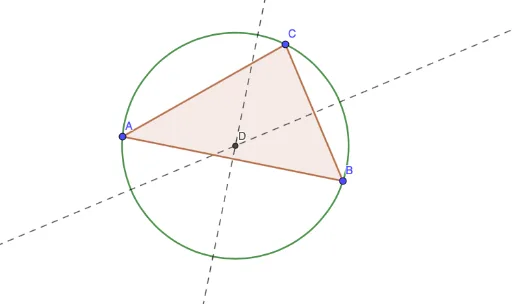
This example demonstrates how to construct geometric objects like triangles, midpoints, perpendicular lines, intersections, and circles using commands Polygon, Midpoint, OrthogonalLine, Intersect, Circle in GeoGebra, and rename them for clear geometric relationships. Core math concepts include orthocenter, geometric distribution, special points, straight lines, and equilateral triangles. Construction highlights involve precise drawing and manipulation of geometric figures using GeoGebra commands, suitable for high school mathematics and geometric construction teaching.
GeoGebra Commands & Parameters
Polygon(A, B, C) → t1, c, a, bMidpoint(c) → D_1Midpoint(a) → EOrthogonalLine(D_1, c) → fOrthogonalLine(E, a) → gIntersect(f, g) → DCircle(D, B) → d
AI Drawing Prompt Reference
Draw a triangle, find the midpoint of one side, then draw a perpendicular line from the midpoint to that side. Do the same for the other side to find its midpoint and draw the perpendicular line. The intersection of these two perpendicular lines is the orthocenter of the triangle. Finally, draw a circle centered at the orthocenter and passing through one vertex of the triangle.
The prompt above was compiled from the original drawing commands and is for reference only.