
Regular Pentagon Surface Area
Loading the math board and drawing, please wait…
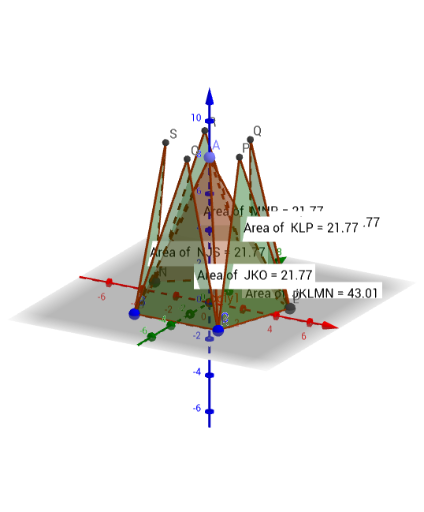
This example demonstrates the calculation and visualization of the surface area of a regular pentagon. It involves core mathematical concepts such as polygon area, solid geometry, integral calculus, circumcircle, and complex numbers. Construction highlights include using commands like Polygon, Midpoint, OrthogonalLine, Intersect, Point, Pyramid, and Net to build the pentagon and its circumscribed pyramid model. Suitable for high school students and math enthusiasts to understand polygon surface area and solid geometry relationships.
GeoGebra Commands & Parameters
Polygon(B, C, 5) → poly1, f, g, h, i, j, D, E, FMidpoint(i) → GMidpoint(h) → HOrthogonalLine(G, i) → kOrthogonalLine(H, h) → lIntersect(k, l) → IPoint(zAxis) → APyramid(poly1, A) → a, faceABC, edgeAF, faceACD, faceADE, faceAEF, faceABF, edgeAB, edgeAC, edgeAD, edgeAENet(a, b) → c, J, S, faceJKLMN, faceJKO, faceKLP, faceLMQ, faceMNR, faceJNS, edgeJK, edgeKL, edgeLM, K, edgeMN, edgeJN, edgeJO, edgeKO, edgeKP, edgeLP, edgeLQ, edgeMQ, edgeMR, edgeNR, L, edgeNS, edgeJS, M, N, O, P, Q, RPointIn(faceJKLMN) → PointfaceJKLMNPointIn(faceLMQ) → PointfaceLMQPointIn(faceMNR) → PointfaceMNRPointIn(faceJNS) → PointfaceJNSPointIn(faceJKO) → PointfaceJKOPointIn(faceKLP) → PointfaceKLP
AI Drawing Prompt Reference
Draw a regular pentagon and its circumcircle. Identify the midpoints of each side and vertex, then connect the midpoints of opposite sides to form perpendicular lines intersecting at the center of the pentagon. Construct a pyramid with the pentagon as the base and the center as the apex, then create and display the net of the pyramid. Place several points randomly on the faces of the net to highlight its geometric features.
The prompt above was compiled from the original drawing commands and is for reference only.