
Regular Division of a Circumference for Animal Design
Loading the math board and drawing, please wait…
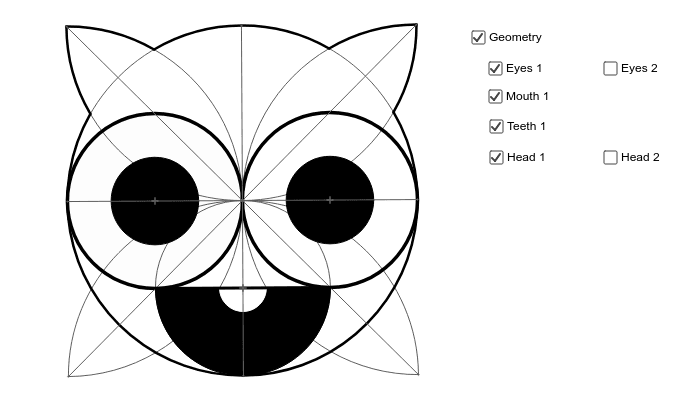
This example demonstrates how to design an animal figure using the regular division of a circumference, combining geometric construction with artistic creativity. The core mathematical concepts involve equal division of a circle, regular polygons, symmetry, and the positional relationships among points, lines, and arcs. Key construction steps include: using the Circle command to draw the base circle, employing Line, Intersect, and OrthogonalLine to construct division points and auxiliary lines, using Point, Segment, and Midpoint to determine key vertices, and applying CircleArc to outline the animal shape. It is suitable for middle school geometry lessons or interdisciplinary math-art activities, helping students understand circle division and fundamental geometric construction techniques.
GeoGebra Commands & Parameters
Circle(A, B) → cLine(B, A) → aIntersect(c, a, 2) → CCircle(B, A) → dCircle(C, A) → eOrthogonalLine(A, a) → bIntersect(c, b) → D, ECircle(D, A) → fCircle(E, A) → gIntersect(d, f, 2) → FIntersect(d, g, 2) → GIntersect(e, g, 2) → HIntersect(e, f, 2) → ICircle(F, 1) → hCircle(G, 1) → kCircle(H, 1) → pCircle(I, 1) → qPoint(q) → RSegment(D, E) → iSegment(B, C) → jMidpoint(A, D) → TMidpoint(A, E) → UMidpoint(C, A) → VCircle(V, A) → d_1Circle(T, A) → e_1Circle(U, A) → f_1CircleArc(B, F, G) → sCircleArc(E, G, H) → tCircleArc(C, H, I) → c_1CircleArc(D, I, F) → rSegment(F, H) → lSegment(G, I) → mCircle(T, A) → g_1Circle(U, A) → h_1Midpoint(T, A) → JCircle(T, J) → k_1Intersect(d_1, e_1, 2) → LIntersect(d_1, f_1, 2) → MSegment(L, M) → a_1CircleArc(V, L, M) → q_1Intersect(r, a_1, 1) → NIntersect(t, a_1, 1) → OSegment(L, M) → b_1Midpoint(N, O) → PCircleArc(P, N, O) → r_1Intersect(c, t, 1) → QIntersect(c, r, 2) → WIntersect(c, s, 1) → ZIntersect(c, s, 2) → A_1CircleArc(A, Z, A_1) → s_1CircleArc(A, Q, W) → t_1CircleArc(E, G, Q) → c_2CircleArc(B, A_1, G) → d_2CircleArc(D, W, F) → e_2CircleArc(B, F, Z) → f_2Intersect(d_1, e_1, 2) → B_1CircleArc(B_1, A, D) → g_2Intersect(d_1, f_1, 2) → C_1CircleArc(C_1, E, A) → h_2CircleArc(U, E, A) → k_2CircleArc(T, A, D) → p_2Circle(T, J) → q_2Intersect(g_2, q_2, 2) → D_1Intersect(g_2, q_2, 1) → E_1CircleArc(T, E_1, D_1) → s_2CircleArc(L, D_1, E_1) → t_2Intersect(f_1, k_2, 1) → H_1Intersect(m, l) → I_1Segment(E_1, D_1) → j_1Circle(T, A) → e_3Circle(U, E) → f_3Midpoint(A, B) → J_1Intersect(c, m, 2) → K_1Intersect(c, l, 2) → L_1Intersect(c, l, 1) → M_1Intersect(c, m, 1) → N_1Intersect(c, r, 2) → O_1Intersect(c, s, 1) → P_1CircleArc(M_1, O_1, P_1) → g_3Intersect(c, s) → Q_1, R_1, ,Intersect(c, t, 1) → S_1CircleArc(N_1, R_1, S_1) → h_3CircleArc(A, S_1, O_1) → k_3CircleArc(A, P_1, R_1) → p_3Intersect(e_1, c_1, 2) → T_1Intersect(f_1, c_1, 1) → U_1Segment(D, E) → n_1CircleArc(T, A, D) → q_3Circle(T, J) → r_3Intersect(i, n_1) → V_1Intersect(i, n_1) → W_1Intersect(r_3, n_1, 1) → Z_1Midpoint(J, Z_1) → A_2CircleArc(A_2, Z_1, J) → s_3Midpoint(n_1) → B_2Midpoint(U, A) → KPoint(i) → F_1CircleArc(U, K, F_1) → p_1CircleArc(U, E, A) → r_2Circle(U, K) → c_3Intersect(c, l) → E_2, F_2Point(c) → G_2Circle(E_2, G_2) → t_3Intersect(c, t_3, 2) → H_2CircleArc(A, G_2, H_2) → d_3CircleArc(E_2, G_2, H_2) → c_4Intersect(c, m, 1) → G_1Point(c) → C_2Point(c) → D_2CircleArc(G_1, C_2, D_2) → d_4
AI Drawing Prompt Reference
Draw an animal shape by first creating a base circle, then equally dividing the circumference using intersecting lines and circles to find key points. Construct auxiliary lines through these points to determine the vertices of the animal shape, and outline the figure with circular arcs connecting the vertices. Maintain symmetry to create an artistic animal design that combines geometric construction with creativity.
The prompt above was compiled from the original drawing commands and is for reference only.