
Reflection Combination 1: Polygon Mirror Transform with Interactive Verification
Loading the math board and drawing, please wait…
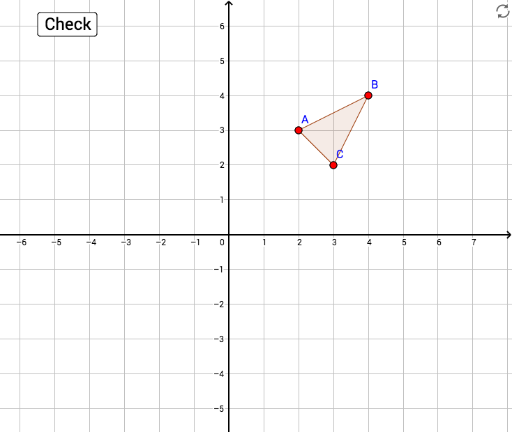
This example demonstrates how a polygon (triangle) undergoes reflection across lines to create a combined transformation, with interactive buttons for step-by-step verification. Core mathematical concepts include reflection (axial symmetry) in plane geometry, composite transformations, congruence of figures, and mirror relations in coordinate geometry. Construction highlights: using GeoGebra commands Polygon to create triangle poly1, Line to define mirror axes, and Mirror to generate reflected polygons and corresponding vertices (e.g., A', B', C'). Interactive elements include a button (button1) and conditional checks (correct1, nailedIt, tryAgain) for feedback, along with auxiliary targets (target1, target2, target3) for matching. Suitable for middle or high school geometry lessons on reflection, symmetry properties, and dynamic interactive verification, either for classroom demonstration or student self-exploration.
GeoGebra Commands & Parameters
Polygon(A, B, C) → poly1, c, a, bPolygon(A', B', C') → poly3, f, d, eLine(D, E) → gMirror(A, g) → target1Mirror(B, g) → target2Mirror(C, g) → target3Polygon(target1, target2, target3) → poly1', c'_1, a'_1, b'_1Mirror(target1, h) → target1'Mirror(target2, h) → target2'Mirror(target3, h) → target3'Polygon(target1', target2', target3') → poly1'', target3'_1, target1'_1, target2'_1Polygon(A'', B'', C'') → poly4, c'', a'', b''