
Reflection and Refraction by Michael Proudman
Loading the math board and drawing, please wait…
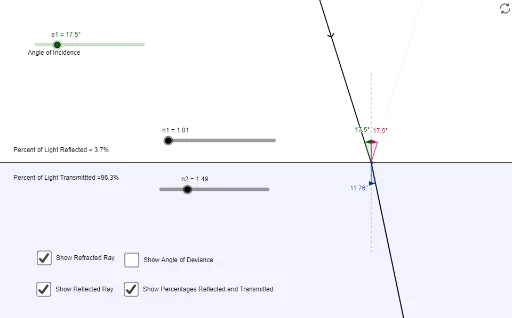
This example demonstrates the geometric construction of reflection and refraction phenomena. Key mathematical concepts include reflection laws, refraction laws, angles, triangles, and circles. Construction involves using GeoGebra commands such as Point, Segment, Rotate, Mirror, Angle, and Polygon, along with objects like points, line segments, angles, and polygons. Suitable for middle or high school mathematics education to understand geometric transformations and optical principles.
GeoGebra Commands & Parameters
Point(xAxis) → CSegment(E, F) → bRotate(B, a1, A) → B'Segment(B', A) → dRotate(B', (-a1) - 3.14159 + asin((n1 * sin(a1) / n2)), A) → BRMirror(B', b) → B''Angle(E, A, B') → αAngle(B'', A, E) → βAngle(F, A, BR) → γPoint(xAxis) → DPoint(xAxis) → GPolygon(D, G, H, I) → poly1, d_1, g, h, iPolygon(D, J, K, G) → poly2, d_2, j, k, g_1Segment(D, G) → cRay(A, B'') → aRay(A, BR) → fPolygon(L_1, M_1, N_1, O_1) → poly3_1, l_1, m_1, n_1, o_1Polygon(L_3, M_3, N_3, O_3) → poly3_3, l_3, m_3, n_3, o_3Polygon(L_4, M_4, N_4, O_4) → poly3_2, l_2, m_2, n_2, o_2Polygon(L_5, M_5, N_5, O_5) → poly3_4, l_4, m_4, n_4, o_4Ray(B', A) → nPoint(n) → PAngle(BR, A, P) → δAngle(P, A, BR) → εTextfield(n2) → inputBox1Textfield(n1) → inputBox2Textfield(a1) → inputBox3
AI Drawing Prompt Reference
This is a geometric figure demonstrating reflection and refraction phenomena. The figure includes points, line segments, angles, triangles, and circles. The construction process involves rotating points, mirroring them, and calculating angles to illustrate reflection and refraction laws. Circles and triangles are also included to explain optical principles. The construction order starts from basic points, then rotates and mirrors to generate new points, calculates angles, and finally combines them into the figure.
The prompt above was compiled from the original drawing commands and is for reference only.