
Reflecting Polygons on the Coordinate Plane
Loading the math board and drawing, please wait…
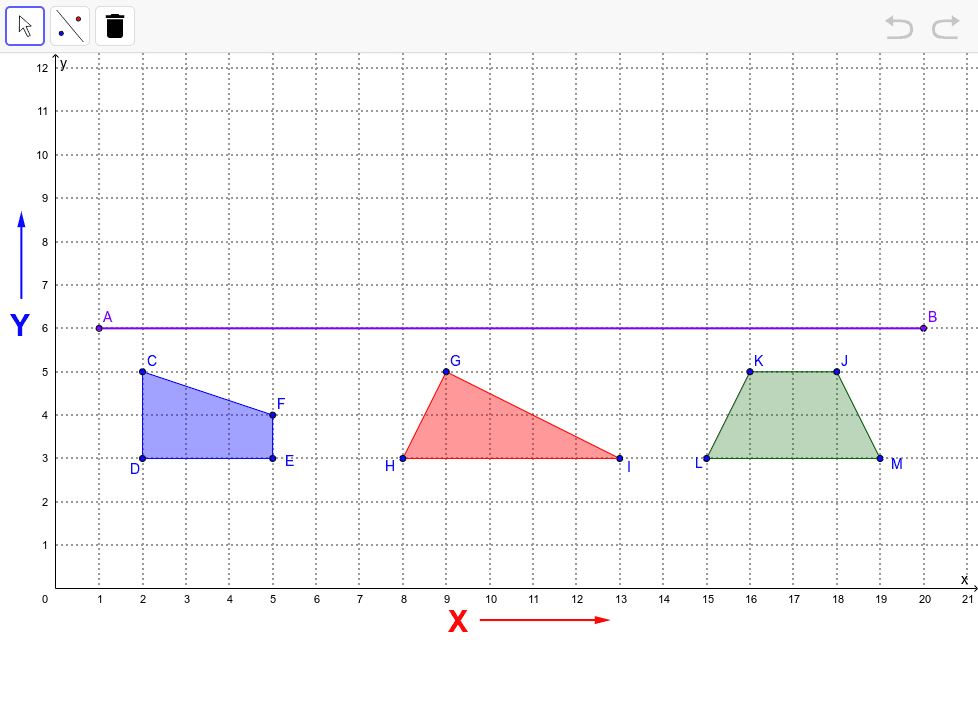
This example demonstrates the dynamic reflection of polygons across axes or points on the coordinate plane. Core mathematical concepts include polygons, coordinate geometry, geometric transformations (reflection), and vector representation. Construction highlights: Segment, Polygon, and Vector commands create segments, polygons, and vectors; objects comprise vertices A, B, C…, polygons poly1, poly2, poly3, and vectors u, v. Suitable for middle‑school geometry lessons, high‑school analytic geometry, and self‑guided GeoGebra exploration.
GeoGebra Commands & Parameters
Segment(A, B) → aPolygon(C, D, E, F) → poly1, c, d, e, fPolygon(G, H, I) → poly2, i, g, hPolygon(J, K, L, M) → poly3, j, k, l, mVector(N, O) → uVector(P, Q) → v
AI Drawing Prompt Reference
Draw a segment on the coordinate plane, then create three polygons — a quadrilateral, a triangle, and another quadrilateral — and add two vectors that represent reflection directions across axes or arbitrary points, enabling the polygons to be dynamically mirrored across those axes or points. The segment serves as a reference line, the polygons are positioned arbitrarily, and the vectors define the translation and reflection parameters for each shape.
The prompt above was compiled from the original drawing commands and is for reference only.