
Reflect an Object through Two Parallel Lines
Loading the math board and drawing, please wait…
In collections
IMP2GBD
Geometry Transformation
Maths for 8th Grade Units 1 to 3
Learn with Lindy: Transformations Intro
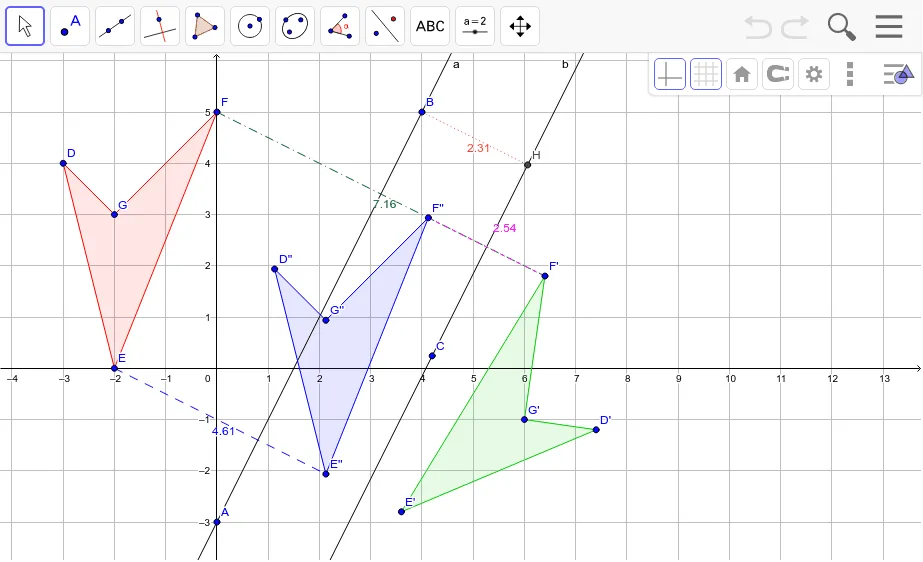
This example demonstrates how to reflect an object through two parallel lines. The key mathematical concept involved is geometric transformations, specifically reflection. Using GeoGebra commands such as Line, Polygon, Mirror, Segment, OrthogonalLine, and Intersect, the reflection can be constructed. Suitable for students at the middle school level and above who are learning about geometric transformations.
GeoGebra Commands & Parameters
Line(A, B) → aLine(C, a) → bPolygon(D, E, F, G) → poly1, d, e, f, gMirror(D, a) → D'Mirror(E, a) → E'Mirror(F, a) → F'Mirror(G, a) → G'Polygon(D', E', F', G') → poly1', d', e', f', g'Mirror(D', b) → D''Mirror(E', b) → E''Mirror(F', b) → F''Mirror(G', b) → G''Polygon(D'', E'', F'', G'') → poly1'', d'', e'', f'', g''Segment(F, F') → cSegment(F', F'') → hSegment(E, E'') → iOrthogonalLine(B, b) → jIntersect(b, j) → HSegment(B, H) → k