
Red and Blue Areas of Polygons
Loading the math board and drawing, please wait…
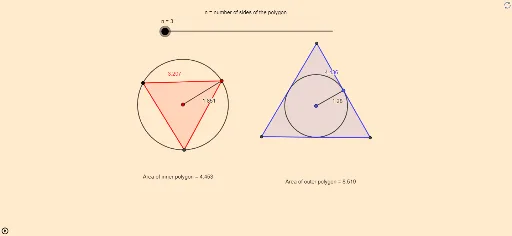
This GeoGebra example dynamically demonstrates the area relationship between red and blue regions inside polygons, using transformations such as rotation and reflection to create symmetric or complementary shapes, visually showing equal areas or proportional relationships. Core mathematical concepts include polygon area calculation, rotational transformation, mirror symmetry, and area decomposition and combination. Construction highlights: using GeoGebra commands like Circle, Rotate, Polygon, Segment, Tangent, Intersect, Mirror, PointIn, Perimeter, and Distance, the construction creates circles, polygons, tangents, intersection points, mirror images, and other objects, with a slider n controlling the number of rotations or divisions to observe area changes dynamically. Suitable for middle and high school geometry teaching, this example helps explore area conservation, symmetry, and the effect of transformations on area, and is ideal for mathematical experiments and inquiry-based learning.
GeoGebra Commands & Parameters
Circle(A, B) → cRotate(B, (360 / n)°, A) → B'Polygon(B, B', n) → poly1, f, q, r, s, t, a, b, d, e, f_1, g_1, g, h_1, i_1, j_1, k_1, l_1, m_1, n_1, p_1, q_1, r_1, h, s_1, C, D, E, F, G, H, I, J, K, i, L, M, N, O, P, Q, R, S, T, U, j, V, W, Z, A_1, B_1, C_1, D_1, E_1, F_1, k, l, m, pSegment(A, B) → t_1Circle(G_1, H_1) → c_1Tangent(H_1, c_1) → a_1,Rotate(H_1, (360°) / n, G_1) → I_1Tangent(I_1, c_1) → b_1,Intersect(a_1, b_1) → J_1Mirror(J_1, H_1) → K_1Polygon(K_1, J_1, n) → poly2, d_1, m_2, n_2, p_2, q_2, r_2, s_2, t_2, a_2, b_2, c_2, e_1, d_2, e_2, f_3, g_3, i_3, j_3, k_3, l_3, m_3, n_3, f_2, p_3, L_1, M_1, N_1, O_1, P_1, Q_1, R_1, S_1, T_1, g_2, U_1, V_1, W_1, Z_1, A_2, B_2, C_2, D_2, E_2, F_2, h_2, G_2, H_2, I_2, J_2, K_2, L_2, M_2, N_2, O_2, i_2, j_2, k_2, l_2Segment(G_1, H_1) → h_3PointIn(poly1) → Pointpoly1_1PointIn(poly2) → Pointpoly2Perimeter(poly1) → perimeterpoly1PointIn(poly1) → Pointpoly1Distance(B', B) → distanceB'B