
Rectangular Prism Volume Calculator
Loading the math board and drawing, please wait…
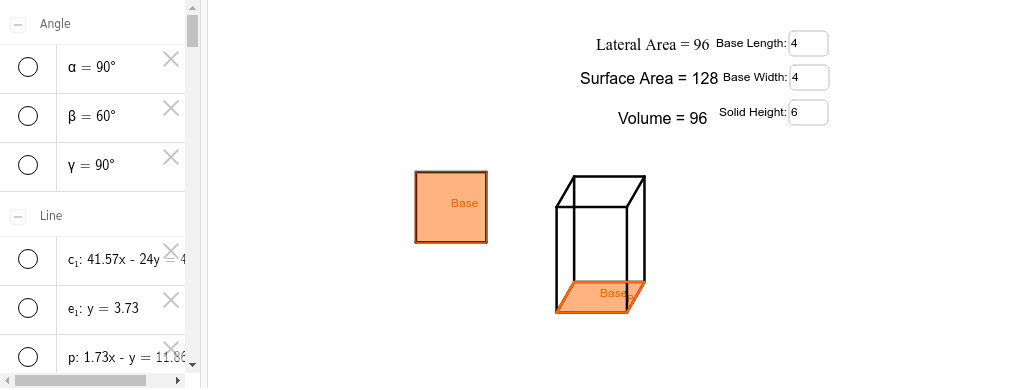
This example demonstrates the calculation of volume for a rectangular prism. It involves core mathematical concepts such as volume formulas and geometric properties of prisms. The construction uses GeoGebra commands like Point, Segment, Rotate, Angle, Polygon, Textfield, Line, Intersect to draw the prism and compute its volume, making it suitable for middle school and above students learning solid geometry volume calculations.
GeoGebra Commands & Parameters
Point(Circle[A, abs(l)]) → BSegment(A, B) → aPoint(Circle[A, abs(w)]) → CSegment(A, C) → bRotate(C, 90*°, A) → C'Angle(C, A, C') → αSegment(C', A) → cPoint(Circle[C', abs(l)]) → DSegment(C', D) → dSegment(D, B) → ePolygon(A, B, D, C') → Base, a_1, b_1, d_1, c'Textfield(l) → MetinAlanı1Textfield(w) → MetinAlanı2Textfield(h) → MetinAlanı3Point(Circle[E, abs(l)]) → FSegment(E, F) → fPoint(Circle[E, abs((0.5 * w))]) → GSegment(E, G) → gRotate(G, 60*°, E) → G'Angle(G, E, G') → βSegment(G', E) → iPoint(Circle[G', abs(l)]) → HSegment(G', H) → jSegment(H, F) → kPoint(Circle[E, abs(h)]) → ISegment(E, I) → mRotate(I, 90*°, E) → I'Angle(I, E, I') → γSegment(I', E) → nLine(I', i) → pLine(I', f) → qLine(G', n) → rLine(H, n) → sLine(F, n) → tIntersect(p, r) → JIntersect(q, t) → KLine(K, p) → c_1Line(J, q) → e_1Intersect(s, c_1) → LSegment(J, I') → f_1Segment(I', K) → g_1Segment(K, L) → h_1Segment(L, J) → i_1Segment(K, F) → j_1Segment(L, H) → k_1Segment(J, G') → l_1Polygon(G', E, F, H) → Base_P, g', e_2, f_2, h_2
AI Drawing Prompt Reference
Draw a rectangular prism to demonstrate volume calculation. Start by sketching the base as a rectangle formed by two perpendicular segments. Extend lines to create the sides, rotating and connecting appropriately. Label the length, width, and height, and compute the volume. Use text fields to display these dimensions and the result. Finally, use intersections and lines to complete the 3D view, highlighting geometric properties and volume formulas.
The prompt above was compiled from the original drawing commands and is for reference only.