
Rectangle Area Formula Development
Loading the math board and drawing, please wait…
In collections
Arithmetic: Skills & Concepts
Arithmetic: Skills & Concepts
Arithmetic: Skills & Concepts
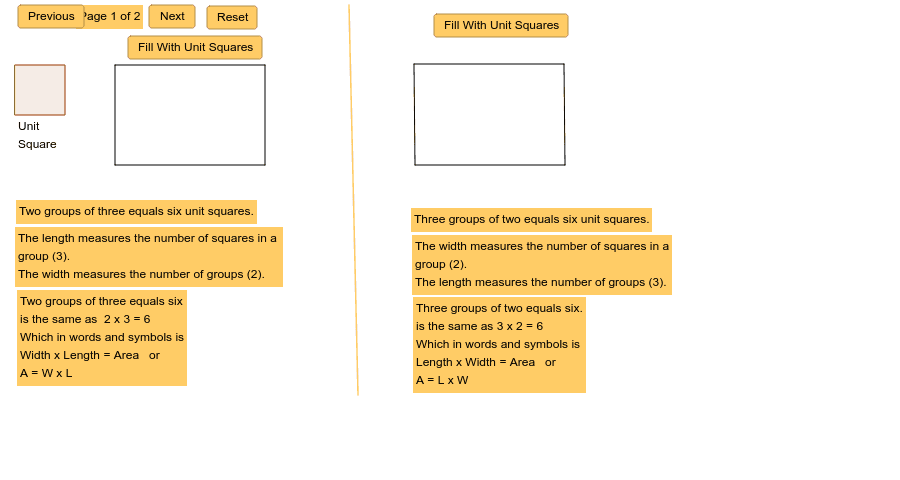
This example dynamically demonstrates how the area of a rectangle changes with variations in its length and width, visually deriving the area formula. Core math concepts include rectangle definition, area calculation, and algebraic operations. Constructed using GeoGebra commands like Polygon, Segment, and Textfield, with interactive elements such as n, button1, and button2. Suitable for middle school students and above, introducing geometric area calculations and advanced concepts like calculus and coordinate geometry.
GeoGebra Commands & Parameters
Polygon(A, B, 4) → poly1, a, b, c, d, C, DPolygon(B, E, 4) → poly2, e, f, g, h, F, GPolygon(E, H, 4) → poly3, i, j, k, l, I, JPolygon(D, C, 4) → poly4, m, q, r, s, K, LPolygon(C, F, 4) → poly5, t, a_1, b_1, c_1, M, NPolygon(F, I, 4) → poly6, d_1, e_1, f_1, g_1, O, PPolygon(Q, R, 4) → poly7, h_1, i_1, j_1, k_1, S, TPolygon(U, V, 4) → poly8, l_1, m_1, n_1, p_1, W, ZPolygon(Z, W, 4) → poly9, q_1, r_1, s_1, t_1, A_1, B_1Polygon(V, C_1, 4) → poly10, a_2, b_2, c_2, d_2, D_1, E_1Polygon(W, D_1, 4) → poly11, e_2, f_2, g_2, h_2, F_1, G_1Polygon(C_1, H_1, 4) → poly12, i_2, j_2, k_2, l_2, I_1, J_1Polygon(D_1, I_1, 4) → poly13, m_2, n_2, p_2, q_2, K_1, L_1Segment(M_1, N_1) → r_2Segment(N_1, O_1) → s_2Segment(O_1, P_1) → t_2Segment(P_1, M_1) → a_3Segment(Q_1, R_1) → b_3Segment(R_1, S_1) → c_3Segment(S_1, T_1) → d_3Segment(T_1, Q_1) → e_3Segment(U_1, V_1) → f_3Polygon(W_1, Z_1, A_2, B_2) → poly14, w_1, z_1, a_4, b_4Textfield(A1) → inputBox1Textfield(A2) → inputBox2Polygon(C_2, D_2, E_2, F_2) → poly15, c_4, d_4, e_4, f_4Textfield(A3) → inputBox3Textfield(A4) → inputBox4
AI Drawing Prompt Reference
Draw a dynamic rectangle to show how its area changes with length and width, including multiple polygons and segments forming a rectangle frame, and text boxes for inputting length and width values, displaying the area formula. Start by drawing the rectangle's frame, add dividing lines, then input length and width values to show the area formula.
The prompt above was compiled from the original drawing commands and is for reference only.