
Recognizing Angle Types
Loading the math board and drawing, please wait…
In collections
Wiederholung Winkel: Bezeichnung, Arten, Messen & Zeichnen
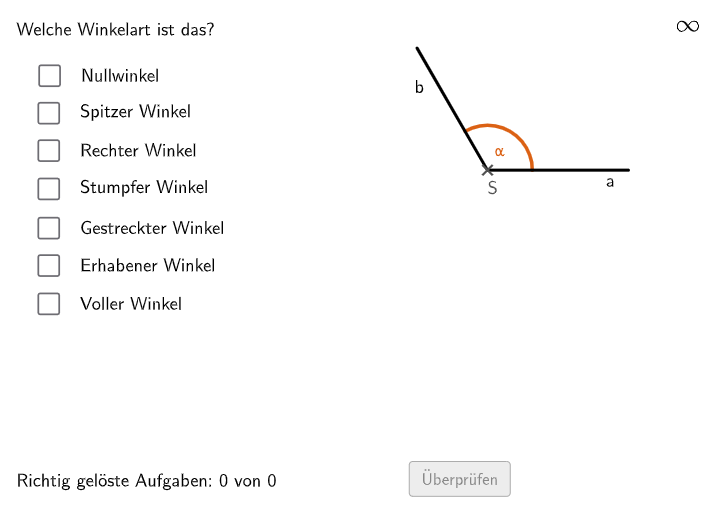
This example demonstrates how to identify different types of angles, including acute, right, obtuse, straight, reflex, and full angles. It involves the core math concepts of angle classification and measurement. The construction points include using GeoGebra commands: If, Sequence, Textfield, Polygon, Segment, Rotate, Circle, Sum, Midpoint, RoundBox, OrthogonalLine, CircleArc. It is suitable for middle school and high school math education, particularly in geometry and measurement.
GeoGebra Commands & Parameters
If(correctN, 1, correctE, 6, correctV, 7, 100, correctSP, 2, correctR, 3, correctST, 4, correctG, 5) → IndexSequence((x(S2), y(S2) + (a * i)), i, 0, 8) → l2Sequence((x(S1), y(S1) + (a * i)), i, 0, 8) → l1Textfield(aInput) → InputBox1Textfield(bInput) → InputBox2Polygon(FBCorner, PtopRightCornerFeedback, PbottomRightCornerFeedback, PbottomLeftCornerFeedback) → rectangleCorrect, ptopleftcornerfeedback, ptoprightcornerfeedback, pbottomrightcornerfeedback, pbottomleftcornerfeedbackSegment(A, B) → fRotate(A, α, B) → A'Segment(B, A') → gCircle(B, 0.8) → cSum(lcorr) → sumMidpoint(Midpoint[B, A'], A') → DRoundBox(radius, FBCorner, breite, länge) → d, e, Vieleck1, h, kOrthogonalLine(E, xAxis) → iCircleArc(B, (x(A) - 1.5, y(A)), A') → βRotate(Midpoint[B, Midpoint[A, B] - (0.5, 0)], α / 2, B) → WinkelTextPunkt
AI Drawing Prompt Reference
Create a geometry diagram for recognizing angle types. Include a reference rectangle in the plane, with several segments drawn from the rectangle’s key corners and an angle arc marking. Construct an angle by taking a starting side and rotating it about a shared vertex to form the second side, then draw a circular arc around the vertex to indicate the angle. Place an angle label near the arc to support classification into acute, right, obtuse, straight, reflex, and full angles. Use auxiliary elements such as midpoint-based construction points and an orthogonal guide to a horizontal axis to shape the layout.
The prompt above was compiled from the original drawing commands and is for reference only.