
Recognize Geometric Shapes
Loading the math board and drawing, please wait…
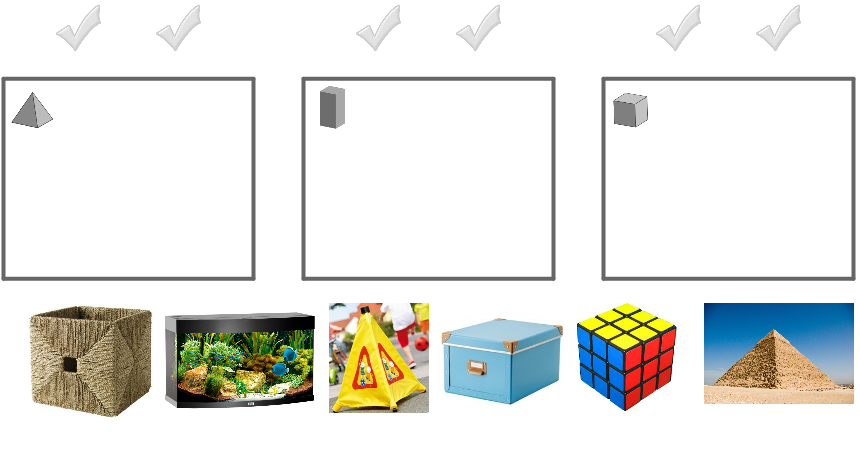
This example demonstrates sorting different geometric shapes into designated areas by dragging. It involves core math concepts like solid geometry (cube, prism, pyramid), coordinate geometry (unit circle), functions (piecewise functions), and optimization problems. Construction highlights the use of GeoGebra commands like Polygon, Corner, and Midpoint. Suitable for high school students for geometric shape recognition and classification practice, as well as visualizing functions and optimization problems.
GeoGebra Commands & Parameters
Polygon(O_1, P_1, Q_1, R_1) → Vieleck1, o_1, p_1, q_1, r_1Polygon(S_1, T_1, U_1, V_1) → Vieleck2, s_1, t_1, u_1, v_1Polygon(W_1, Z_1, A_2, B_2) → Vieleck3, w_1, z_1, a_2, b_2Corner(pyramideYellow, 3) → ACorner(pyramide, 3) → BCorner(prismBox, 3) → CCorner(prismFish, 3) → DCorner(cubeBox, 3) → ECorner(cubeRubiks, 3) → FMidpoint(U_2, A) → GMidpoint(W_2, B) → HMidpoint(A_3, C) → IMidpoint(E_3, D) → JMidpoint(C_3, E) → KMidpoint(G_3, F) → L
AI Drawing Prompt Reference
Draw a geometric shape sorting example showing different solid shapes like cubes, prisms, and pyramids being dragged into designated areas. Include a unit circle and piecewise function graphs, with key points marked and midpoints connected to form helper lines, demonstrating geometric construction and optimization concepts.
The prompt above was compiled from the original drawing commands and is for reference only.