
Ratios - Expressed as Fractions
Loading the math board and drawing, please wait…
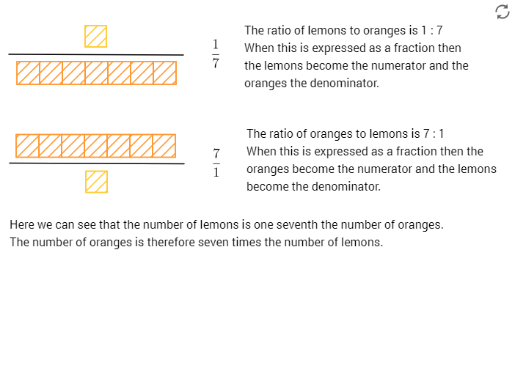
This example demonstrates how to express ratios as fractions. It involves key mathematical concepts such as ratios and fractions. Using GeoGebra commands like Polygon and Segment, the example constructs representations of ratios. Suitable for middle school and above students to learn about ratios and fractions.
GeoGebra Commands & Parameters
Polygon(A, B, 4) → poly1, f, g, h, i, C, DSegment(E, F) → jPolygon(G, H, 4) → poly2, k, l, m, n, I, JPolygon(J, I, 4) → poly3, p, q, r, s, K, LPolygon(L, K, 4) → poly4, t, a, b, c, M, NPolygon(N, M, 4) → poly5, d, e, f_1, g_1, O, PPolygon(P, O, 4) → poly6, h_1, i_1, j_1, k_1, Q, RPolygon(R, Q, 4) → poly7, l_1, m_1, n_1, p_1, S, TPolygon(T, S, 4) → poly8, q_1, r_1, s_1, t_1, U, VPolygon(A_1, B_1, 4) → poly1_1, f_2, g_2, h_2, i_2, C_1, D_1Segment(E_1, F_1) → j_2Polygon(G_1, H_1, 4) → poly2_1, k_3, l_3, m_3, n_3, I_1, J_1Polygon(J_1, I_1, 4) → poly3_1, p_3, q_3, r_3, s_3, K_1, L_1Polygon(L_1, K_1, 4) → poly4_1, t_3, a_1, b_1, c_1, M_1, N_1Polygon(N_1, M_1, 4) → poly5_1, d_1, e_1, f_3, g_3, O_1, P_1Polygon(P_1, O_1, 4) → poly6_1, h_3, i_3, j_3, k_2, Q_1, R_1Polygon(R_1, Q_1, 4) → poly7_1, l_2, m_2, n_2, p_2, S_1, T_1Polygon(T_1, S_1, 4) → poly8_1, q_2, r_2, s_2, t_2, U_1, V_1
AI Drawing Prompt Reference
Draw a geometric diagram to show how to express ratios as fractions. First, draw two squares, each divided into regions of different ratios with line segments. Use different colors to highlight these regions, and connect the dividing segments with arrows to indicate the ratio relationships.
The prompt above was compiled from the original drawing commands and is for reference only.