
Random Ball Drawing Probability Practice
Loading the math board and drawing, please wait…
In collections
Wahrscheinlichkeitsrechnung - Einführung
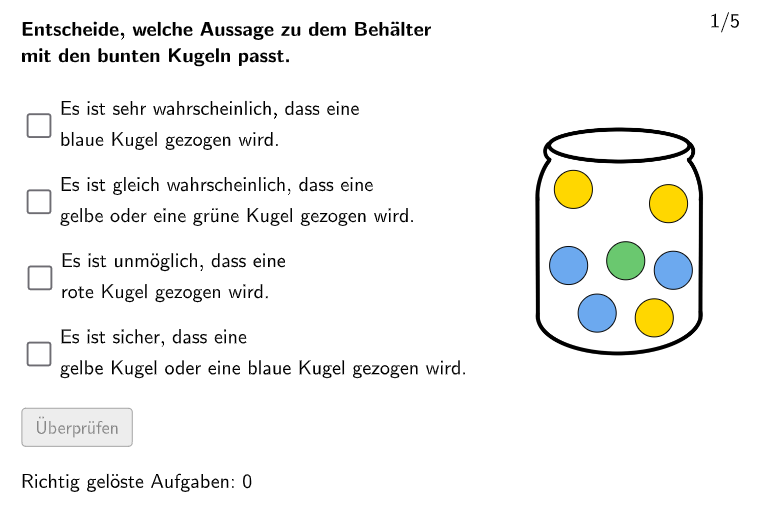
This example simulates a random ball drawing game in an interactive exercise format, helping students understand basic probability concepts. The core mathematical concept is quantifying probability and calculating probabilities of random events. Construction details: Uses GeoGebra's Shuffle command to randomly order question lists, Element command to randomly select specific questions from lists, implements multiple-choice interaction via checkboxes (chk01-chk04), validates answers with btnValidate button, and tracks student's attempt counts (correctCount/attemptCount). Suitable for grades 7-8 students, this example can be used in classroom to introduce probability fundamentals or as homework practice, helping students build intuitive understanding of probability concepts.
GeoGebra Commands & Parameters
Shuffle(1…numberOfQuestions) → randomQuestions, {4, 3, 2, 1, 5}Element(randomQuestions, Mod[questionCount, Length[randomQuestions]] + 1) → randomQuestionElement(allQuestions, randomQuestion) → actualQuestionShuffle(Sequence[Element[actualQuestion, i], i, 2, numberOfAnswers + 1]) → actualAnswersShuffled, {{"\\Es ist sehr wahrscheinlich, dass eine \\ blaue Kugel gezogen wird.", false}, {"\\Es ist gleich wahrscheinlich, dass eine \\ gelbe oder eine grüne Kugel gezogen wird.", false}, {"\\Es ist unmöglich, dass eine \\ rote Kugel gezogen wird.", true}, {"\\Es ist sicher, dass eine \\ gelbe Kugel oder eine blaue Kugel gezogen wird.", false}}Element(actualAnswersShuffled, 3) → actualAnswer03Element(actualAnswer03, 2) → chk03ExpectedElement(actualAnswersShuffled, 2) → actualAnswer02Element(actualAnswer02, 2) → chk02ExpectedElement(actualAnswersShuffled, 1) → actualAnswer01Element(actualAnswer01, 2) → chk01ExpectedElement(actualAnswersShuffled, 4) → actualAnswer04Element(actualAnswer04, 2) → chk04ExpectedElement(punkteKugeln, 6) → kugel6Element(punkteKugeln, 7) → kugel7Element(punkteKugeln, 8) → kugel8Element(punkteKugeln, 1) → kugel1Element(punkteKugeln, 2) → kugel2Element(punkteKugeln, 3) → kugel3Element(punkteKugeln, 4) → kugel4Element(punkteKugeln, 5) → kugel5Shuffle(Element[kugelnFarbenAlle, randomQuestion]) → kugelnFarben, {"#ffd700", "#6ac86f", "#ffd700", "#ffd700", "#6ca9ef", "#6ca9ef", "#6ca9ef"}
AI Drawing Prompt Reference
Draw a random ball drawing probability practice diagram with 5 balls of different colors (yellow, green, blue, red, purple). Randomly select one ball and determine the probability based on its color. Use checkboxes to select the correct answers, and a button to validate the answers. Keep track of the number of attempts.
The prompt above was compiled from the original drawing commands and is for reference only.