
Radius of Circle Inscribed in Isosceles Trapezoid
Loading the math board and drawing, please wait…
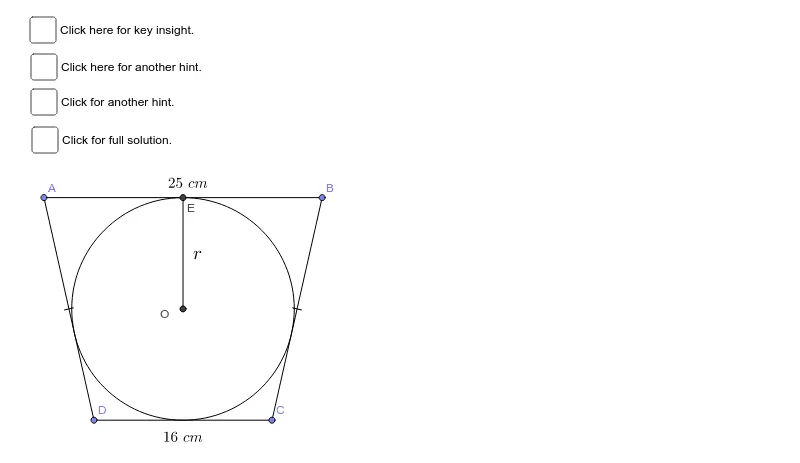
This example demonstrates how to find the radius of a circle inscribed in an isosceles trapezoid with a top base of 16 cm and a bottom base of 25 cm. Key mathematical concepts include the properties of isosceles trapezoids and circles. The construction uses GeoGebra commands such as Point, Segment, Circle, Intersect, etc. Suitable for students at the middle school level and above to learn geometric construction and properties of circles.
GeoGebra Commands & Parameters
Point(Circle[H, 16]) → B_1Point(Circle[B_1, 4.5]) → BPoint(Circle[H, 4.5]) → APoint(Circle[H, 20]) → DPoint(Circle[A_1, 20]) → CSegment(C, D) → iSegment(C, B) → jSegment(D, A) → kSegment(A, B) → aMidpoint(a) → EMidpoint(i) → GSegment(E, G) → bMidpoint(b) → OCircle(O, 10) → cSegment(O, A) → dSegment(O, E) → eIntersect(c, j) → H_1, FSegment(O, B) → gSegment(O, C) → lSegment(O, G) → mDistance(B, H_1) → distanceCHDistance(H_1, C) → distanceHE1Segment(D, H) → nSegment(O, F) → fRotate(C, -90*°, F) → JAngle(J, F, C) → αRotate(D, -90*°, G) → E'Angle(E', G, D) → βRotate(D, -90*°, H) → E'_1Angle(E'_1, H, D) → γSegment(E, B) → pSegment(B, F) → qPoint(Circle[H_2, 20]) → D_1Segment(D_1, H_2) → n_1Rotate(D_1, -90*°, H_2) → E'_2Angle(E'_2, H_2, D_1) → γ_1Segment(O, F) → s
AI Drawing Prompt Reference
Draw an isosceles trapezoid with a top base of 16 cm and a bottom base of 25 cm, then construct its inscribed circle. Start by marking the endpoints of the top base, find the midpoint of the top base, and draw a circle with radius 4.5 cm centered at this midpoint to locate the points where it intersects the top base. Use these points to determine the center of the inscribed circle, then draw the circle. Connect the center to all vertices of the trapezoid and measure the segments and angles to verify the properties of the inscribed circle.
The prompt above was compiled from the original drawing commands and is for reference only.