
Radians: Measuring Angles using Arc Length
Loading the math board and drawing, please wait…
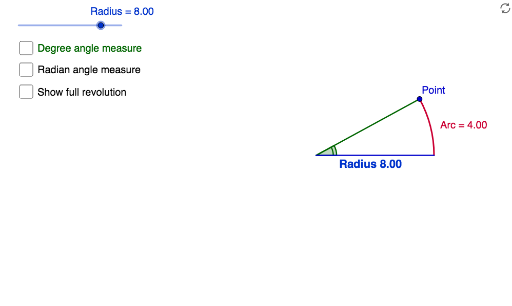
This example demonstrates how to measure angles using arc length, highlighting the relationship between the circumference of a circle and its radius. Key mathematical concepts include similar triangles, arc length formulas, and the conversion between degrees and radians. Construction involves using GeoGebra commands like Intersect, Point, Segment, CircleArc, and Angle to create radius, arcs, and angles. Suitable for middle or high school mathematics to understand geometric and trigonometric concepts.
GeoGebra Commands & Parameters
Intersect(xAxis, yAxis) → APoint(Circle[A, Radius]) → BSegment(A, B) → RIntersect(c, xAxis, 2) → CCircleArc(A, C, B) → ArcAngle(C, A, B) → DSegment(A, C) → aPoint(c) → D_1Point(c) → EPoint(c) → FPoint(c) → GPoint(c) → HPoint(c) → IIntersect(k, R) → J,Segment(A, J) → jIntersect(k, a) → K,Intersect(k, R, 1) → LCircleArc(A, K, L) → fSegment(M, N) → lSegment(O, P) → mAngle(C, A, B) → α
AI Drawing Prompt Reference
Draw a circle with a center and radius, then draw a line intersecting the circle to mark the intersection points. Connect the radius to the line from the center to form an angle, and draw an arc to represent the arc length of the angle. Label the arc length and angle value. Then draw a parallel line to the radius, mark the intersection point, and draw another arc to form a different angle, labeling the angle value.
The prompt above was compiled from the original drawing commands and is for reference only.