
Quiz on Solving One-step Linear Equations (2)
Loading the math board and drawing, please wait…
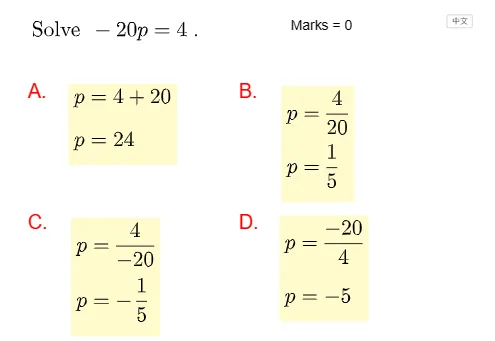
This example demonstrates a quiz on solving one-step linear equations. The core mathematical concepts include the methods of solving linear equations. Randomly generated questions allow students to practice solving equations. GeoGebra commands such as Remove, RandomElement, and Random are used. Suitable for middle school mathematics education.
GeoGebra Commands & Parameters
Remove(Sequence[i, i, -9, 9], {0, 1}) → list1RandomElement(list1) → aRandomElement(list1 \ {-1}) → kRandomElement({"a", "b", "m", "n", "p", "k", "x", "y"}) → var, "p"Random(1, 4) → qtypeShuffle({(0, 0), (5, 0)}) → listPosition, {(0, 0), (5, 0)}If(qtype ≟ 1, text1correct, qtype ≟ 2, text2correct, qtype ≟ 3, text3correct, qtype ≟ 4, text4correct) → textCorrectIf(qtype ≟ 1, text1wrong1, qtype ≟ 2, text2wrong1, qtype ≟ 3, text3wrong1, qtype ≟ 4, text4wrong1) → textwrong1If(qtype ≟ 1, text1wrong2, qtype ≟ 2, text2wrong2, qtype ≟ 3, text3wrong2, qtype ≟ 4, text4wrong2) → textwrong2If(qtype ≟ 1, text1wrong3, qtype ≟ 2, text2wrong3, qtype ≟ 3, text3wrong3, qtype ≟ 4, text4wrong3) → textwrong3Shuffle({A, B, C, D}) → listPos, {(0.6, 0.2), (5.4, 0.2), (5.4, -2.8), (0.6, -2.8)}Circle(P - (0.8, 0.1), 0.5) → d
AI Drawing Prompt Reference
Display a quiz on solving linear equations with randomly generated questions and answer options, using different colors to distinguish correct and incorrect answers, with random numbers and variables in the background, elements are randomly arranged, suitable for middle school mathematics education style.
The prompt above was compiled from the original drawing commands and is for reference only.