
Quadratic Standard Form Exploration
Loading the math board and drawing, please wait…
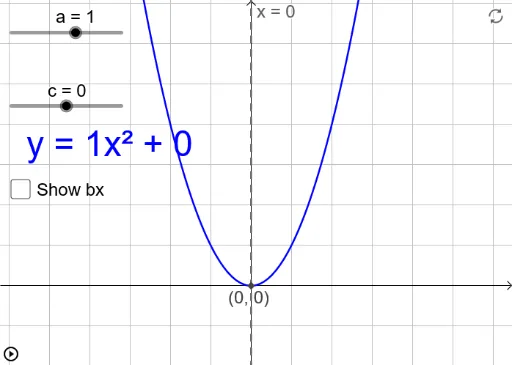
This example demonstrates how adjusting parameters a, b, and c in the standard form of a quadratic function affects its graph. Key math concepts include the direction of the parabola's opening, axis of symmetry, vertex coordinates, and the impact of parameters on the graph. GeoGebra commands/objects used: objects a, b, c, f, ac, d, e, A, g, text2, text1, showcasing dynamic parameter changes via sliders. Suitable for high school students to understand the relationship between quadratic function graphs and parameter variations.
GeoGebra Commands & Parameters
Numeric a(1)Numeric b(0)Numeric c(0)f(x) = (a * x^(2)) + (b * x) + c(a * c)b^(2) - (4 * ac)Boolean e(false)(((-b)) / ((2 * a)), f(((-b)) / ((2 * a))))x = x(A)
AI Drawing Prompt Reference
Draw a quadratic function graph in standard form, adjusting parameters a, b, and c to observe changes in the parabola's opening direction, axis of symmetry, and vertex. Start by setting a, b, and c to 1, 0, and 0 respectively, then plot the function f(x) = ax^2 + bx + c. Calculate the product of a and c, the difference between b squared and 4ac, determine the vertex coordinates, and draw the axis of symmetry.
The prompt above was compiled from the original drawing commands and is for reference only.