
Quadratic Function Point Plotting with Vertex Method
Loading the math board and drawing, please wait…
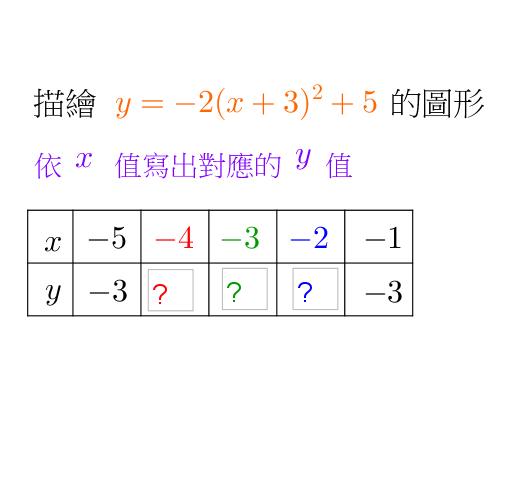
This example demonstrates how to draw a parabola for a quadratic function using the point-plotting (描点法) / vertex method (顶点法). It emphasizes locating key points—especially the vertex and symmetry-related points—so the graph can be completed accurately. The main mathematical ideas are quadratic-function graph properties, the vertex and axis of symmetry, determining the parabola from essential points, and related geometric visualization (including tangent-line/“tangent” style annotations). Construction highlights from the provided GeoGebra commands include: Textfield for interactive parameter input and labeling; Segment for building connecting auxiliary segments between constructed points; and Translate to create translated points/lines that support symmetry or reusable geometric constructions. Input box objects drive the computed points, while multiple text label objects (with suffixes) are used to display intermediate results clearly. Suitable for middle to high school function instruction, graphing practice, and GeoGebra-based geometry construction learning.
GeoGebra Commands & Parameters
Textfield(y1) → inputBox1Textfield(y2) → inputBox1_1Textfield(y2) → inputBox2Textfield(y3) → inputBox3Segment((0, 1.2), (0, 0)) → eSegment((0, 0), (5.1, 0)) → fTranslate(f, (0, 0.6)) → f'Translate(f, (0, 1.2)) → f'_1Translate(e, (0.6, 0)) → e'Translate(e, (1.5, 0)) → e'_1Translate(e, (2.4, 0)) → e'_2Translate(e, (3.3, 0)) → e'_3Translate(e, (4.2, 0)) → e'_4Translate(e, (5.1, 0)) → e'_5
AI Drawing Prompt Reference
Draw a parabola for a quadratic function. Focus on locating key points, especially the vertex and symmetry-related points, to ensure accurate graph completion. Construct using text fields for parameter input, segments to connect auxiliary points, and translations to create symmetric points or reusable geometric constructions. Input box objects drive computed points, and multiple text label objects (with suffixes) display intermediate results. Suitable for middle to high school function instruction, graphing practice, and geometry construction learning.
The prompt above was compiled from the original drawing commands and is for reference only.