
Quadratic Factoring Puzzle
Loading the math board and drawing, please wait…
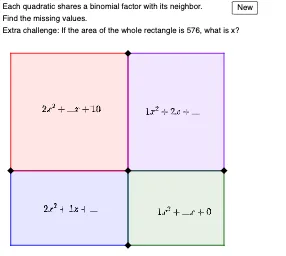
This example uses a puzzle game to demonstrate quadratic factoring. Key math concepts include quadratic functions and factoring. It utilizes commands such as Random, RandomElement, RemoveUndefined, If, Polygon, Coefficients, Centroid, Max. Suitable for middle school and above students to learn the method of factoring quadratic equations.
GeoGebra Commands & Parameters
Random(-5, 5) → m2Random(-5, 5) → l2Random(-5, 5) → k2Random(-5, 5) → j2RandomElement(l1) → mRandomElement(l1) → lRandomElement(l1) → kRandomElement(l1) → jRemoveUndefined(Sequence[If[n(i), i], i, -20, 20]) → l4If(Defined[RandomElement[l4]], RandomElement[l4], 6.5) → xsPolygon(A, B, E, (x(A), y(E))) → q1, a, b, e, fPolygon(A, B, C, (x(A), y(C))) → q2, a_1, b_1, c, gPolygon(D, B, C, (x(D), y(C))) → q3, d, b_2, c_1, hPolygon(D, B, E, (x(D), y(E))) → q4, d_1, b_3, e_1, iRandom(-5, 5) → k2_1Random(-5, 5) → j2_1Coefficients(q_1) → lq1Coefficients(q_2) → lq2Coefficients(q_3) → lq3Coefficients(q_4) → lq4Centroid(q1) → FCentroid(q2) → GCentroid(q3) → HCentroid(q4) → IMax(y(C) + 5, (aspect * (x(D) + 2)) + y(E) - 1) → ymaxIf(ymax ≟ y(C) + 5, (y(C) - y(E) + 6) / (aspect) - 1, x(D) + 1) → xmax
AI Drawing Prompt Reference
Draw a quadratic factoring puzzle game interface. Create a large rectangle divided into four smaller rectangles, each containing a quadratic polynomial with random integer coefficients. Mark the centroid of each small rectangle with a point. Add a text box above or beside the figure displaying a randomly generated quadratic expression for the user to factor. The overall layout is on a coordinate plane with axes and grid lines, light background, clear graphics, suitable for educational demonstration.
The prompt above was compiled from the original drawing commands and is for reference only.