
Pythagorean Theorem by Lamberto Lamberti
Loading the math board and drawing, please wait…
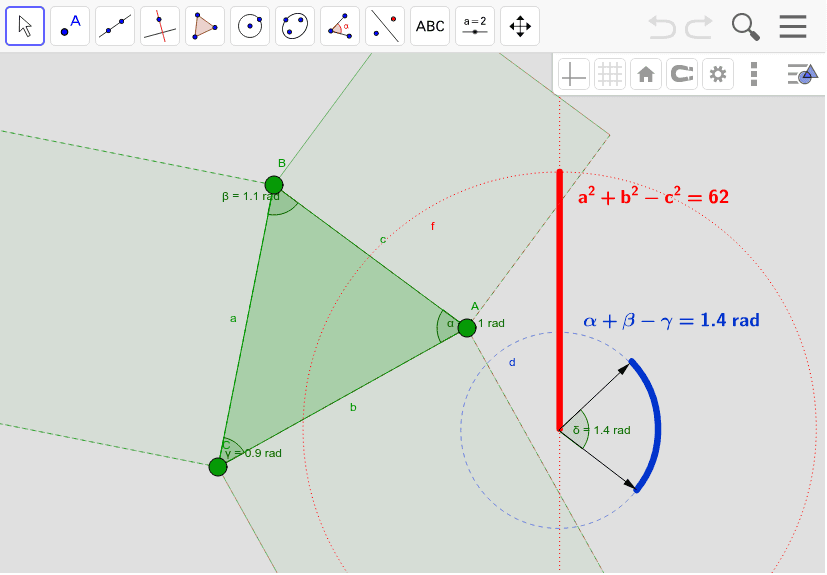
This example demonstrates the Pythagorean Theorem in a right-angled triangle ABC, where the square of the hypotenuse c equals the sum of the squares of the other two sides a and b. Key concepts include the Pythagorean Theorem. It uses commands like Polygon, Angle, Circle, Rotate, Vector, OrthogonalLine, Intersect, Segment, CircleArc. Suitable for middle school and above students for geometric construction.
GeoGebra Commands & Parameters
Polygon(B, C, A) → poli1, a, b, cAngle(B, A, C) → αAngle(C, B, A) → βAngle(A, C, B) → γCircle(D, E) → dRotate(E, angoli, D) → E'Angle(E, D, E') → δVector(D, E) → uVector(D, E') → vOrthogonalLine(F, xAxis) → eCircle(F, quadrati / 10) → fIntersect(f, e) → G, HSegment(H, F) → gCircleArc(F, E, E') → hPolygon(C, B, 4) → poli2, i, j, k, l, I, JPolygon(B, A, 4) → poli3, m, n, p, q, K, LPolygon(A, C, 4) → poli4, r, s, t, a_1, M, N
AI Drawing Prompt Reference
Draw a right-angled triangle ABC with angle C as the right angle. Construct sides a, b, and c representing the two legs and the hypotenuse. Use these sides to construct four squares, each with a side length equal to one of the triangle's sides. Through rotation and constructing orthogonal lines, demonstrate the Pythagorean theorem, where the area of the square on the hypotenuse c equals the sum of the areas of the squares on the other two sides a and b.
The prompt above was compiled from the original drawing commands and is for reference only.