
Pyramid Volume Conjecture Demo
Loading the math board and drawing, please wait…
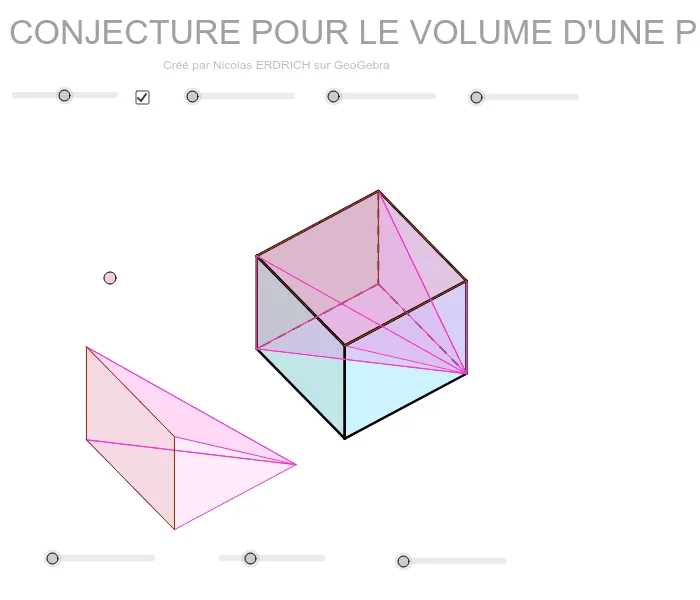
This example demonstrates the geometric validation of the pyramid volume formula by dynamically constructing a pyramid and its inscribed cube, visually showing the volume relationship. Core math concepts include volume calculation, similar triangles, trigonometry, and calculus ideas. Construction highlights use of GeoGebra commands like Sequence, Element, Point, Polygon, Segment, PointIn, Translate, and objects such as dynamic points and translations. Suitable for high school solid geometry teaching to deepen understanding of volume formulas and spatial reasoning skills.
GeoGebra Commands & Parameters
Sequence(Mat * Element[cube, k], k, 1, 8) → cube'Element(Element[AE, 3], 1) → droiteSequence((Element[cube', k, 1, 1], Element[cube', k, 2, 1]), k, 1, 8) → listepointsPoint(listepoints) → APoint(listepoints) → EPoint(listepoints) → C_1Point(listepoints) → DPolygon(A, E, C_1, D) → poly1, a_1, b, c_1, dPoint(listepoints) → BPoint(listepoints) → FPoint(listepoints) → GPoint(listepoints) → HPolygon(B, F, G, H) → poly2, e, f, g, hPoint(listepoints) → CPolygon(F, C, A, B) → poly3, f_1, i, a_2, b_1Element(AB, 3, 1) → avantPolygon(C_1, G, H, E) → poly4, c_2, g_1, h_1, e_1Element(AC, 3, 1) → dessusPolygon(F, C, C_1, G) → poly5, f_2, c_3, c_4, g_2Polygon(A, B, H, E) → poly6, a_3, b_2, h_2, e_2Segment(E, A) → cSegment(A, C) → jSegment(A, B) → kSegment(C, C_1) → lSegment(C_1, E) → mSegment(H, E) → nSegment(A, B) → pSegment(B, H) → qSegment(H, E) → rSegment(H, G) → sSegment(B, F) → tSegment(G, C_1) → d_1Segment(F, G) → i_1Segment(F, C) → j_1PointIn(poly5) → JTranslate(J, Vector[val1 * Vector[A, B]]) → pyr1_1Translate(A, Vector[val1 * Vector[A, B]]) → pyr1_2Translate(B, Vector[val1 * Vector[A, B]]) → pyr1_3Translate(H, Vector[val1 * Vector[A, B]]) → pyr1_4Translate(E, Vector[val1 * Vector[A, B]]) → pyr1_5Polygon(pyr1_1, pyr1_2, pyr1_3) → poly11, pyr1_6, pyr1_7, pyr1_8Polygon(pyr1_1, pyr1_3, pyr1_4) → poly12, pyr1_9, pyr1_{10}, pyr1_{11}Polygon(pyr1_5, pyr1_1, pyr1_2) → poly13, pyr1_{12}, pyr1_{13}, pyr1_{14}Polygon(pyr1_5, pyr1_4, pyr1_3, pyr1_2) → poly14, pyr1_{15}, pyr1_{16}, pyr1_{17}, pyr1_{18}Translate(J, Vector[val2 * Vector[A, E]]) → pyr2_1Translate(E, Vector[val2 * Vector[A, E]]) → pyr2_2Translate(H, Vector[val2 * Vector[A, E]]) → pyr2_3Translate(C_1, Vector[val2 * Vector[A, E]]) → pyr2_4Translate(G, Vector[val2 * Vector[A, E]]) → pyr2_5Polygon(pyr2_1, pyr2_2, pyr2_3) → poly15, pyr2_6, pyr2_7, pyr2_8Polygon(pyr2_1, pyr2_4, pyr2_5) → poly16, pyr2_9, pyr2_{10}, pyr2_{11}Polygon(pyr2_1, pyr2_3, pyr2_5) → poly17, pyr2_{12}, pyr2_{13}, pyr2_{14}Polygon(pyr2_4, pyr2_2, pyr2_3, pyr2_5) → poly18, pyr2_{15}, pyr2_{16}, pyr2_{17}, pyr2_{18}Translate(J, Vector[val3 * Vector[D, A]]) → pyr3_1Translate(F, Vector[val3 * Vector[D, A]]) → pyr3_2Translate(B, Vector[val3 * Vector[D, A]]) → pyr3_3Translate(G, Vector[val3 * Vector[D, A]]) → pyr3_4Translate(H, Vector[val3 * Vector[D, A]]) → pyr3_5Polygon(pyr3_1, pyr3_3, pyr3_2) → poly19, pyr3_6, pyr3_7, pyr3_8Polygon(pyr3_2, pyr3_4, pyr3_5, pyr3_3) → poly20, pyr3_9, pyr3_{10}, pyr3_{11}, pyr3_{12}Polygon(pyr3_1, pyr3_2, pyr3_4) → poly21, pyr3_{13}, pyr3_{14}, pyr3_{15}Polygon(pyr3_1, pyr3_5, pyr3_4) → poly22, pyr3_{16}, pyr3_{17}, pyr3_{18}
AI Drawing Prompt Reference
Draw a pyramid with an inscribed cube to dynamically demonstrate the volume relationship between them. The pyramid's base is a square, and the cube's base coincides with the pyramid's base. Generate key points for the pyramid's and cube's side faces through sequence operations, then connect these points to form polygons. Translate these polygons along specific directions to construct the three-dimensional shapes of the pyramid and cube. Finally, highlight key parts of the pyramid and cube to visually verify the volume formula.
The prompt above was compiled from the original drawing commands and is for reference only.